A ceiling fan that wobbles is annoying at low speed and genuinely unsafe at high speed, especially when a light kit adds 3 to 6 pounds of glass hanging below the motor. The wobble loosens screws a little more every hour it runs, the light kit rattles, bulbs burn out early from vibration, and in the worst case a shade works free and drops. Most people reach for the balancing kit first, but that is actually the last step. Balancing weights fix a fan that is already tight, level, and clean; they cannot fix a loose mounting bracket or a bent blade arm. Follow the order below and you will solve the wobble in under an hour.
What You Need
| Item | Why | Optional? |
|---|---|---|
| Step ladder (6 ft for 8- to 9-ft ceilings) | You need to reach the canopy at the ceiling, not just the blades | No |
| Phillips and flat screwdrivers | Blade screws, light-kit screws, and canopy screws use both | No |
| Fan balancing kit (clip plus adhesive weights) | Corrects blade weight differences of 1 to 3 grams that cause wobble at speed | No, if steps 1–5 do not fix it |
| Tape measure or yardstick | Checks blade tip height to find a bent or drooping blade | No |
| Microfiber cloth and mild cleaner | Dust buildup of even a few grams on one blade unbalances the fan | No |
| Non-contact voltage tester | Confirms power is off before touching the canopy wiring | Yes, but recommended |
| Thread-locking compound (removable grade) | Keeps blade screws from backing out again | Yes |
A basic balancing kit with a clip and nine 3-gram weights, like the SUNIYORS kit, costs around $5. That is the only purchase most people need. Keep all screws from the fan in a magnetic tray so nothing rolls off the ladder.
Our top picks

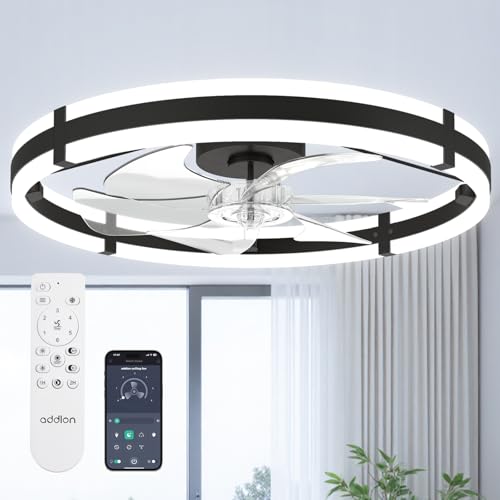 addlon 24" Low Profile Fandelier Ceiling Fans
- Wider Airflow for Larger Rooms:Upgraded from our 20″…
- Dimmable LED Light with 3 Color Temperatures:This ceiling…
- Remote & APP Control with Memory Function: Control…
As an Amazon Associate we earn from qualifying purchases at no extra cost to you.
Step-by-Step
Step 1: Turn off power and clean the blades (10 minutes)
Switch the fan off at the wall and flip the breaker if you plan to touch the canopy. Wipe every blade, top and bottom, with a damp microfiber cloth. Kitchen-adjacent fans carry greasy dust that can weigh several grams per blade, which is enough to cause a visible wobble on its own. Clean the light-kit glass at the same time.
Step 2: Tighten the blade and blade-arm screws (10 minutes)
Each blade attaches to a blade arm with 2 or 3 screws, and each arm attaches to the motor flywheel with 2 more. Check every one. Loose blade screws are the single most common cause of wobble on fans more than a year old. Snug them firmly but do not overtighten; wood-composite blades crack if you crank the screws. A drop of removable thread-locker on each screw prevents a repeat.
Step 3: Check the light kit and shades (5 minutes)
Remove the glass shade or bowl and check the light kit’s mounting screws where it attaches to the motor housing. Tighten them. Reinstall the shade and make sure the thumb screws or twist-lock collar are fully seated. A glass bowl that is seated crooked by even a quarter inch shifts the fan’s center of mass. Confirm bulbs are snug in their sockets; a loose bulb rattles and mimics wobble.
Step 4: Inspect the canopy and mounting bracket (10 minutes)
Loosen the canopy screws and slide the canopy down to expose the mounting bracket. With the power confirmed off, grab the downrod and push it side to side. Any movement means the bracket screws into the ceiling box are loose, or the box itself is not fan-rated. Tighten the two bracket screws. If the box moves in the ceiling, stop here; that is a structural problem covered in the section on calling a pro. Check that the downrod set screw and its cross pin are tight, then reinstall the canopy.
Step 5: Measure blade tip height (5 minutes)
Stand the yardstick on a table or hold a tape measure from the ceiling and note the distance to the tip of each blade at the same rotation point. All tips should be within 1/8 inch of each other. A blade that sits 1/4 inch or more lower than the others has a bent arm. Gently bend the arm upward by hand to match, or swap the arm with a replacement.
Step 6: Test and balance with the kit (15 minutes)
Restore power and run the fan on high. If it still wobbles, attach the plastic balancing clip to the trailing edge of one blade, midway between the hub and tip. Run the fan. Move the clip to each blade in turn and note which position reduces wobble the most. On that blade, slide the clip toward the tip or hub in 1-inch increments until the wobble is minimal. Peel a 3-gram adhesive weight and stick it on top of the blade directly in line with the clip position, then remove the clip. If a slight wobble remains, add a second weight. Most fans need 3 to 6 grams total.
Mistakes to Avoid
- Starting with the balancing kit. Weights on a fan with loose screws just mask the problem for a few weeks.
- Testing at low speed only. Wobble that only shows up on high is still wobble; balance at the highest speed you actually use.
- Bending a blade arm too far. Metal arms bend once or twice before fatiguing. Move in small increments.
- Ignoring the downrod ball. The ball at the top of the downrod must sit fully in the bracket cradle with the tab in its slot. A misseated ball causes a rhythmic wobble that no weight will fix.
- Running a fan on a non-rated box. A standard plastic light box is rated for about 50 pounds static, but a fan’s dynamic load requires a metal box marked “acceptable for fan support.”
- Placing weights on the underside. They are visible, catch dust, and peel faster. Always put them on top of the blade.
How Often
Check blade and light-kit screws every 6 months, ideally when you switch the blade direction for summer and winter. Clean blades every 1 to 2 months in kitchens and every 3 months elsewhere. Rebalancing is rarely needed more than once every few years unless a blade is replaced or the fan is moved. If a fan needs rebalancing every few months, something is loose or warped and weights are not the answer.
When to Call a Pro or Replace
Call an electrician if the ceiling box moves when you push on the downrod, if the fan is mounted to a plastic box, or if you see scorching or brittle insulation on the wires in the canopy. Replacing a ceiling box with a fan-rated brace typically costs $150 to $300 installed.
Replace the fan if the motor housing itself wobbles independently of the blades (worn motor bearings), if the flywheel is cracked, or if the fan is a budget model more than 12 to 15 years old with warped blades. Modern low-profile fandeliers are inexpensive and dramatically lighter than older cast-housing fans. A 24-inch low-profile model with integrated light and remote, such as the addlon fandelier at roughly $60, weighs a fraction of a 52-inch five-blade fan and puts far less stress on the mounting box. For most bedrooms up to about 150 square feet, that size is adequate, and in 2026 a full replacement often costs less than a single service call.
FAQ
Is a small wobble normal for a ceiling fan?
A movement of about 1/8 inch at the blade tips on high speed is within normal tolerance for most residential fans. Anything you can clearly see from across the room, or that rattles the light kit, should be corrected.
Can the light kit alone cause the wobble?
Yes. A loose light kit or an off-center glass bowl shifts the center of mass below the motor and produces a wobble that gets worse with speed. Always check the light kit before balancing the blades.
How much weight does a balancing kit add?
Each adhesive weight is typically 3 grams (about 0.1 ounce). A fan usually needs one or two weights on a single blade. If you find yourself adding four or more, a blade is warped or mismatched and should be replaced.
Do I need to balance a new fan out of the box?
Usually not, but blade sets are matched at the factory within a small tolerance, and shipping can bend an arm. If a new fan wobbles, check blade tip heights first, then tighten screws, then balance.