When a ceiling fan remote stops controlling the light, most people replace the batteries, try again, and then assume the remote is dead. Often it is not. The remote talks to a receiver hidden in the fan canopy, and that receiver can lose its pairing, lose power from a switched-off wall switch, or be confused by a neighbor’s fan on the same frequency code. Buying a new remote before checking those is a wasted $15 to $40, and buying a new fan because “the light stopped working” is a wasted $50 to $200. Work through these steps in order; most remote failures are solved in the first 15 minutes without opening anything.
What You Need
| Item | Why | Optional? |
|---|---|---|
| Fresh batteries (usually one 12V A23 or two AAA) | Low voltage causes intermittent range and a remote that only works up close | No |
| Step ladder | Reaching the canopy at the ceiling to access the receiver | No, if pairing fails |
| Phillips screwdriver | Canopy screws and the receiver’s dip switch cover | No, if pairing fails |
| Non-contact voltage tester | Confirms power is off before touching canopy wiring | No, if opening the canopy |
| Small flathead or pen tip | Flipping dip switches on older remotes and receivers | Only for dip-switch models |
| Known-good bulb | Rules out a burned-out bulb before blaming the remote | No |
| Universal fan remote kit (receiver plus handset) | Replaces a dead receiver on most AC-motor fans | Yes |
| Phone with the fan’s app | For app-controlled fans, to re-pair over Wi-Fi or Bluetooth | Only for smart fans |
A universal 3-in-1 remote kit with receiver for AC-motor fans, such as the LPHUMEX kit compatible with Hunter, Harbor Breeze, Westinghouse, and Honeywell fans, costs about $13. If the fan itself is aging, a modern 52-inch fan with integrated light, remote, and app control like the OJX sells for around $42, which is less than many replacement OEM remotes.
Our top picks
 OJX 52 Inch Ceiling Fans with Lights
- 【Smart Ceiling Fans with APP & Remote Control】This…
- 【Quiet Reversible DC Motor】 The fan ceiling with…
- 【Dimmable & Energy-Efficient LED Lighting】This modern ceiling fan…
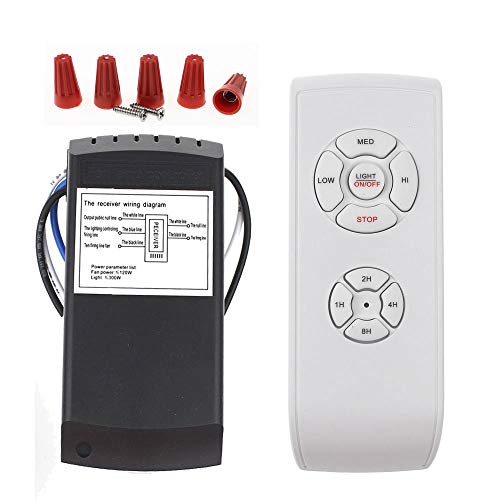 LPHUMEX Universal Ceiling Fan Remote Control Kit
- ☞Easy Installation - Installation of the Universal Ceiling…
- 🛑 STRICT COMPATIBILITY CHECK
- 📏 MEASURE BEFORE BUYING
As an Amazon Associate we earn from qualifying purchases at no extra cost to you.
Step-by-Step
Step 1: Rule out the obvious (5 minutes)
Make sure the wall switch is on; a fan receiver has no power when the switch is off, and a family member flipping it is the number one cause of “the remote died.” Confirm the pull chain for the light, if the fan has one, is in the on position. Replace the bulb with a known-good one rated for the fixture. Then replace the remote batteries with fresh ones, checking the polarity marks, and stand within 10 feet of the fan with a clear line of sight.
Step 2: Test the remote signal (2 minutes)
Press the light button and watch for a small indicator light on the remote. No indicator means the remote’s circuit board or battery contacts have failed. An indicator that lights but the fan does not respond means the remote is transmitting and the problem is pairing, the receiver, or the fan wiring.
Step 3: Re-pair the remote to the receiver (5 minutes)
Most learning remotes pair the same way: turn the wall switch off for 30 seconds, turn it back on, and within 30 seconds press and hold the pairing button, often the fan-off or light button, for 3 to 5 seconds until the light blinks or the fan responds. If your remote came with instructions, follow its exact sequence. App-controlled fans typically pair by power-cycling and then choosing “add device” in the app while the fan light blinks.
Step 4: Check the dip switches (10 minutes)
Older remotes use 4 or 5 tiny dip switches inside the battery compartment that must match the switches on the receiver in the canopy. Note the remote’s pattern. Turn off the breaker, test for voltage, lower the canopy, find the receiver, and compare. If they differ, set the receiver to match. If a neighbor’s fan responds to your remote or yours behaves erratically, change both to a new matching pattern.
Step 5: Inspect the receiver and its connections (10 minutes)
With the breaker still off, look at the receiver. Check for burn marks, a swollen case, or a plastic smell, all of which mean it has failed. Tug each wire connection; a loose neutral or light-load wire will let the fan spin while the light stays dark. Also look for a small wattage limiter module on the light kit, which can fail and cut the light entirely while the fan keeps working.
Step 6: Replace the receiver or remote (20 minutes)
If the receiver has failed, swap in a universal kit matched to your fan’s motor type (AC motors take universal kits; DC-motor fans need the manufacturer’s receiver). Connect line and neutral from the ceiling to the receiver input, and the receiver’s fan and light outputs to the fan’s matching wires, using wire nuts. Tuck the receiver into the canopy, restore power, and pair the new handset. If only the remote is dead and the receiver is fine, an OEM or compatible replacement handset with the same frequency and code pairs in Step 3.
Mistakes to Avoid
- Assuming the remote is dead when the wall switch is off. Check the switch first, every time.
- Using a universal receiver on a DC-motor fan. DC fans need their own receiver; a universal kit will not spin the motor and may damage it.
- Skipping the 30-second power-off in pairing. The receiver needs a full reset before it will accept a new handset.
- Exceeding the light kit wattage. Most fan light kits are limited to 190 watts total, and a wattage limiter will shut the light off if you exceed it. Use LED bulbs at 8 to 12 watts each.
- Buying a remote by fan brand alone. The same brand uses several frequencies. Match the model number printed on the old remote or receiver.
- Working with the wall switch off but the breaker on. Some fans are wired so the receiver has power even when the switch is off. Always kill the breaker.
How Often
Replace remote batteries once a year or whenever range drops below about 15 feet; write the date on the battery with a marker. Re-pairing is not routine; it is only needed after a battery change on some models, a power outage on a few older receivers, or a remote replacement. Receivers last 8 to 12 years on average but fail earlier in fans that run constantly or in hot attics. When you do your twice-yearly blade cleaning and screw check, take 2 minutes to press each remote button and confirm all functions work, so a partial failure is caught before summer. In 2026 many new fans use app control alongside the handset, which also gives you a backup if the handset is misplaced.
When to Call a Pro or Replace
Call an electrician if you see scorched wiring in the canopy, if the light works from the pull chain but never from any remote after replacing the receiver, or if the fan is on a 3-way or dimmer switch that may be feeding the receiver a chopped voltage. Dimmers should never control a remote-equipped fan. A service call runs $100 to $200.
Replace the fan when the receiver has failed on a DC-motor fan whose manufacturer no longer sells parts, when the light kit’s socket or wattage limiter has burned and no replacement exists, or when the fan is more than 15 years old and the motor also hums or wobbles. A new 52-inch fan with integrated LED light and both remote and app control costs $40 to $150 and installs in about an hour on an existing fan-rated box.
FAQ
Why does my ceiling fan work but the light does not respond to the remote?
Check the bulb and the light pull chain first. If both are fine, the receiver’s light output or the light kit’s wattage limiter has failed. Re-pair the remote, and if the fan still spins while the light stays off, replace the receiver.
How do I reset a ceiling fan remote?
Turn the wall switch off for 30 seconds, turn it on, and within 30 seconds hold the pairing button (often fan-off or the light button) for 3 to 5 seconds until the fan or light responds. Older units require matching dip switches instead.
Can I use a universal remote with any ceiling fan?
Universal kits work with most AC-motor fans from major brands. They do not work with DC-motor fans, which require the manufacturer’s receiver, or with fans that use a wall-mounted control instead of a canopy receiver.
How long do ceiling fan remote batteries last?
About 12 to 18 months with daily use. A23 12-volt batteries drop off quickly once they weaken, so a remote that only works within a few feet almost always needs a new battery, not a new receiver.