Our Top Picks
The best E Ink tablet for distraction-free writing is the reMarkable Paper Pro for the most paper-like drafting experience, while the reMarkable 2 is the lighter, lower-cost choice, the Kindle Scribe suits readers who also want a large e-book library, and the BOOX Note Air4 C is the most flexible option for apps, documents, and keyboard-based work.
For a focused writing setup, the screen, pen response, export workflow, and physical size matter more than a long feature list. E Ink tablets remove notifications and bright backlighting from the writing surface, but they are not identical: some are excellent digital notebooks, some are better PDF workstations, and others behave more like stripped-down Android tablets.
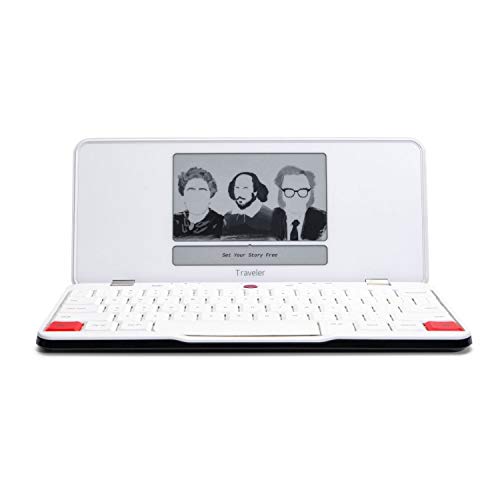
Freewrite Traveler | Lightweight and Portable Typewriter with E Ink Digital Screen for Distraction-Free Drafting | Word Processor with Wifi Cloud Sync and Long Battery Life for Writers on the Move
Picked as a relevant option in this category.
View on Amazon
Amazon Kindle Scribe 64GB (newest model) — 11” display with front light, paper-like feel, and no distractions — Write in notebooks, docs, and books. Pen included - Graphite
Chosen because it specifies paper-like feel and and no distractions — Write in notebooks.
View on Amazon
VIWOODS AiPaper 10.65" AI E Ink Tablet, Digital Notebook Bundle with Pen
Chosen because it specifies Digital Notebook Bundle with Pen.
View on Amazon
reMarkable Paper Pro with Marker Plus and Black Leather Book Folio
Picked as a relevant option in this category.
View on AmazonQuick comparison of the leading writing tablets
| Tablet | Screen and writing area | Approx. weight | Writing feel and latency | Battery expectation | Export and keyboard support |
|---|---|---|---|---|---|
| reMarkable Paper Pro | 11.8-inch color E Ink; about 10.1 × 7.1 inches overall | About 525 g | Very natural pen friction; fast response for handwriting | Typically days to a couple of weeks, depending on use | PDF, PNG, SVG, DOCX and cloud export; optional folio keyboard |
| reMarkable 2 | 10.3-inch monochrome E Ink; about 9.7 × 7.4 inches overall | About 403 g | Excellent low-friction-free writing feel; responsive but older hardware | Often around one to two weeks with moderate use | PDF, PNG and document exports; optional Type Folio keyboard |
| Kindle Scribe | 10.2-inch monochrome E Ink; about 9.0 × 7.7 inches overall | About 433 g | Smooth pen input with a broad page; less notebook-like software | Generally weeks rather than days for mixed reading and writing | PDF and document workflows; no standard built-in keyboard accessory |
| Kobo Elipsa 2E | 10.3-inch monochrome E Ink; about 9.1 × 7.7 inches overall | About 390 g | Comfortable for notes and annotations; not the fastest option | Usually several weeks of intermittent use | Notebook and PDF export; no dedicated keyboard cover |
| BOOX Note Air4 C | 10.3-inch color E Ink; about 9.0 × 7.7 inches overall | About 435 g | Good adjustable refresh response; more electronic than paper-like | Often several days to roughly two weeks, depending on apps and front light | Android apps, PDF, DOCX and cloud services; Bluetooth and USB keyboards |
Dimensions and battery figures are approximate because covers, pen storage, refresh settings, front lights, Wi-Fi, and software updates change the result. Manufacturer battery claims generally assume lighter use than an active writer produces.
Which tablet is right for your writing situation?
| Your situation | Best fit | Why | Main compromise |
|---|---|---|---|
| You want the closest digital notebook experience | reMarkable Paper Pro | Large writing surface, low-distraction interface, strong pen feel, and a useful optional keyboard | Higher cost and more limited app ecosystem |
| You draft at a small desk or coffee table | reMarkable 2 | Thin, light, easy to move, and comfortable for handwriting | Monochrome display and less capable document handling |
| You read books as much as you write | Kindle Scribe | Large screen, strong reading ecosystem, and long battery life | Writing notebooks and keyboard use are less central to the design |
| You annotate PDFs and use multiple services | BOOX Note Air4 C | Android apps, split-screen tools, color highlighting, and broad file compatibility | More settings and more opportunities for distraction |
| You want a straightforward large notebook for less money | Kobo Elipsa 2E | Large monochrome page, comfortable reading, and useful handwritten notes | Fewer writing accessories and slower-feeling software than premium alternatives |
Writing feel: friction, pen technology, and latency
The reMarkable models are the strongest choices when the physical sensation of drafting is the priority. Their textured surfaces create controlled resistance, so the pen does not skate across the glass-like surface found on many conventional tablets. That resistance is especially useful for small handwriting, editing marks, and long paragraphs where hand control matters.
The Kindle Scribe and Kobo Elipsa 2E offer a smoother, more conventional stylus experience. They are comfortable for notes, annotations, and forms, but writers who like a pencil-on-paper sensation may prefer a textured screen. The BOOX Note Air4 C adds color and flexible software, although its writing experience is more dependent on refresh mode. Fast modes reduce visible delay but may make text and graphics look less crisp until the screen refreshes.
For prose drafting, look for low perceived latency rather than a laboratory number alone. A pen that responds quickly but produces uneven strokes can feel less natural than a slightly slower pen with predictable lines. Pressure sensitivity, palm rejection, and the ability to rest your hand on the page are also important during long sessions.
Screen size and comfort at a home desk
A 10.3-inch screen is the practical middle ground. It gives you a page large enough for normal handwriting while keeping the tablet close to the footprint of a paperback-sized notebook. An 11.8-inch display, such as the Paper Pro’s, is more comfortable for wide margins, mind maps, and PDFs, but it occupies more space and adds weight.
Allow at least 24 inches of desk depth for a tablet, folio keyboard, drink, and writing hand without constantly pushing the device toward the edge. On a 36-inch-wide desk, a 10-inch tablet leaves room for a compact lamp and a notebook. On a 20-inch-deep console or narrow wall-mounted desk, the reMarkable 2 is easier to place than a larger color model.
For a small 10 × 12-foot room, a tablet can make a full desk unnecessary: a 30- to 36-inch-wide writing surface is enough for the device and a lamp. If you write with a keyboard, allow approximately 28 to 32 inches of width for the tablet in its stand, keyboard, and forearm position.
Battery life and distraction control
Monochrome E Ink tablets generally last longer than color models because they use less power for the display and do not need to refresh color pigments. Wi-Fi synchronization, front-light brightness, Bluetooth keyboards, and frequent page turns reduce runtime. A realistic planning range is several days for intensive daily writing and one to several weeks for intermittent note-taking, rather than assuming the longest advertised figure.
Distraction control varies sharply. The reMarkable 2 and Paper Pro are intentionally narrow in scope: you can write, organize, read supported documents, and export, but you cannot install a large collection of social or entertainment apps. The Kindle Scribe is similarly quiet during writing, though its reading environment is more prominent. BOOX devices can be made distraction-free with a writing-only home screen, but Android access means discipline is still required.
Export options: decide where your draft goes
- For handwritten notes: reMarkable offers conversion and export workflows through its connected services, with PDF and image formats useful for sharing.
- For editable prose: check handwriting-to-text support and DOCX export before buying. Conversion quality depends on handwriting clarity, language, and layout.
- For marked-up research: PDF export is the safest common denominator. Confirm whether annotations remain visible when the file is opened on a computer.
- For cloud-heavy workflows: BOOX provides the broadest app flexibility, while Kindle and Kobo are more tied to their respective ecosystems.
- For privacy-sensitive drafts: use local USB transfers when available, disable automatic synchronization, and review the manufacturer’s cloud settings.
If your final manuscript must be edited in a word processor, do not assume handwriting recognition will replace typing. It works best for clean block letters and short notes. A keyboard accessory or Bluetooth keyboard remains more dependable for producing a long, editable first draft.
Keyboard support and typing comfort
The reMarkable Type Folio and Paper Pro’s compatible keyboard folio are the most integrated options for writers who want one device for handwriting and typing. They protect the screen and hold the tablet at a usable angle, but they add weight and make the package feel more like a small laptop.
BOOX is the better choice if you already own a compact Bluetooth keyboard or want to use a USB-C keyboard. Its software flexibility supports more writing applications, but keyboard behavior can vary by app. Kindle Scribe and Kobo Elipsa 2E are better treated as pen-first tablets; they can support document entry in limited ways, but neither is the natural pick for a keyboard-centered drafting workflow.
Durability, covers, and moving the setup
The fragile points are usually the pen tip, folio hinges, charging port, and screen surface rather than the E Ink panel during ordinary use. A folio adds protection but can also add roughly 200–400 grams, turning a 400-gram tablet into a noticeably heavier item in a bag. Keep the pen secured separately if the cover does not hold it firmly.
For a shared home office, choose a cover with a stable writing angle rather than a thin sleeve alone. A tablet placed flat on a deep desk is less likely to slide, but a raised stand can be knocked over by a pet or child. Avoid storing any E Ink tablet under heavy books or inside a tightly packed bag; pressure damage can produce permanent display artifacts.
Price expectations in 2026
Basic or older monochrome writing tablets usually fall around $250–$450, mainstream large-screen models around $350–$500, and premium color or keyboard-ready systems around $500–$900 before accessories. Pens, folios, keyboards, and replacement tips can add $50–$250, so compare the complete writing setup rather than the tablet alone.
Final recommendation
Choose the reMarkable Paper Pro if writing feel, a spacious page, and a calm interface come first. Choose the reMarkable 2 for the lightest, simplest drafting setup at a lower price. Choose the Kindle Scribe if reading and writing belong in the same device. Choose the BOOX Note Air4 C if export flexibility, color documents, and keyboard or app support outweigh the risk of distraction. For a budget-conscious reader who mainly needs handwritten notes and PDF marking, the Kobo Elipsa 2E remains a sensible large-screen alternative.