Our Top Picks
The best LGA 775 CPU for most upgrades is the Core 2 Quad Q9550, while the Core 2 Duo E8400 is the better low-cost choice for older everyday systems and the Q9650 is the fastest broadly compatible 775 option when the price is reasonable.
Best 775 CPU options at a glance
| Processor | Cores / threads | Clock speed | FSB | TDP | Best for |
|---|---|---|---|---|---|
| Core 2 Quad Q9650 | 4 / 4 | 3.00 GHz | 1333 MHz | 95 W | Maximum stock performance on LGA 775 |
| Core 2 Quad Q9550 | 4 / 4 | 2.83 GHz | 1333 MHz | 95 W | Best overall upgrade value |
| Core 2 Quad Q9400 | 4 / 4 | 2.66 GHz | 1333 MHz | 95 W | Affordable multitasking and light gaming |
| Core 2 Duo E8400 | 2 / 2 | 3.00 GHz | 1333 MHz | 65 W | Low-power everyday computing |
| Core 2 Duo E8600 | 2 / 2 | 3.33 GHz | 1333 MHz | 65 W | Fast dual-core systems and overclocking |
| Xeon X5460 | 4 / 4 | 3.16 GHz | 1333 MHz | 120 W | Experimental budget quad-core builds |
Our top picks by upgrade situation
Best overall: Core 2 Quad Q9550
The Q9550 combines four cores, a 2.83 GHz clock speed, 12 MB of L2 cache and a manageable 95 W thermal design power. It is usually the most sensible endpoint for a compatible LGA 775 computer because it delivers much better multitasking than older dual-core chips without the premium often attached to the Q9650.
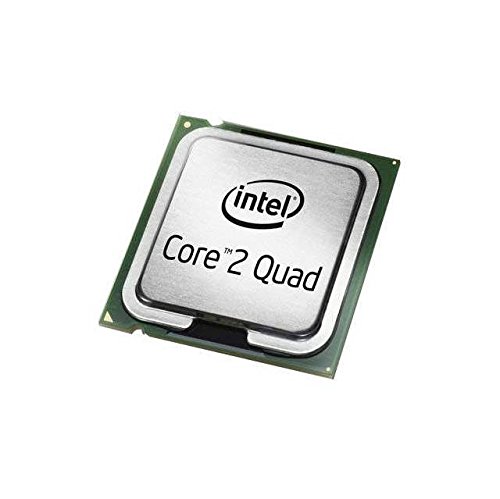
Intel Core 2 Quad Q9550 Processor 2.83GHz 1333MHz 12MB LGA 775 CPU, OEM
Chosen because it specifies OEM.
View on Amazon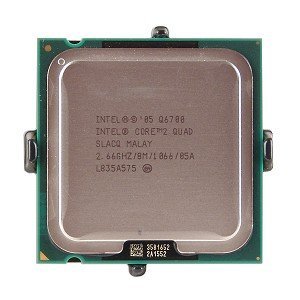
Intel Core 2 Quad Q6700 2.66GHz 1066MHz 8MB Socket 775 Quad-Core CPU
Picked as a relevant option in this category.
View on AmazonChoose it for a computer used for office applications, older games, light photo work, media playback and several programs running at once. It is especially attractive when the motherboard supports a 1333 MHz front-side bus and the BIOS lists the Yorkfield processor family.
Fastest mainstream choice: Core 2 Quad Q9650
The Q9650 is the fastest standard desktop Core 2 Quad commonly associated with LGA 775. Its 3.00 GHz clock speed and four cores make it a strong final upgrade for systems based on Intel P35, P43, P45, X38 or X48 chipsets, provided the motherboard firmware supports it.
Do not automatically pay a large premium for the Q9650. The performance difference from a Q9550 is normally modest, while used-market prices can vary substantially. The Q9650 makes sense when it costs only slightly more or when you want the highest practical stock-clock option.
Best budget dual-core: Core 2 Duo E8400
The E8400 remains a useful inexpensive upgrade for a basic computer. It runs at 3.00 GHz, uses a 65 W TDP and produces less heat than the quad-core alternatives. For web browsing, documents, older 2D games and a media center, its lower power draw can be more valuable than four aging cores.
Its limitation is responsiveness under parallel workloads. Modern browsers, security software and background services can overwhelm two cores more easily than they did when the E8400 was released. Select it only when the computer’s use is light or the quad-core options are unavailable.
Best dual-core performance: Core 2 Duo E8600
The E8600 raises the stock speed to 3.33 GHz while retaining a 65 W TDP. It is a good match for older games and applications that favor high single-threaded speed. However, its value depends heavily on price because a Q9550 is usually a more capable long-term upgrade for multitasking.
Best alternative for enthusiasts: Xeon X5460
The Xeon X5460 can offer four cores at 3.16 GHz, but it is not a simple drop-in purchase. Many X5460 processors require a modified BIOS, an adapter sticker or a motherboard-specific microcode modification to work in an LGA 775 board. The chip also has a 120 W TDP, so cooling and motherboard power delivery matter.
Treat a converted Xeon as a project rather than the safest recommendation. It can be worthwhile for experimentation, but a native Q9550 or Q9650 is usually easier to install and troubleshoot.
Compatibility checks before buying
- Socket: Confirm that the board has an LGA 775 socket. A similar-looking LGA 771 Xeon is not automatically compatible.
- Chipset: P35, P43, P45, X38 and X48 boards commonly support 45 nm Yorkfield processors, but the exact model depends on the motherboard.
- BIOS: Check the manufacturer’s CPU support list and minimum BIOS version. A newer CPU may physically fit but fail to boot without updated microcode.
- Front-side bus: Q9550, Q9650 and E8400-family chips generally require a 1333 MHz FSB setting. Older 1066 MHz-only boards may not support them.
- Power delivery: Inspect the motherboard’s voltage-regulator area and the power supply. A 120 W Xeon is a poor match for a basic board with weak cooling.
- Memory: The processor upgrade does not remove the board’s DDR2 or DDR3 limitations. Four to eight gigabytes is a practical minimum for a comfortable legacy Windows or Linux setup.
Clock speed, cores and real upgrade value
Clock speed is useful but not decisive. An E8600 at 3.33 GHz can feel quick in a lightly threaded application, yet a Q9550 at 2.83 GHz is considerably better when the operating system, browser and other programs need CPU time simultaneously. Four cores also help older video encoders, compression tools and games that can distribute work across multiple threads.
| Use case | Recommended type | Why | Main limitation |
|---|---|---|---|
| Documents, music and basic browsing | Core 2 Duo E8400 | Low heat and adequate single-thread speed | Limited headroom with many browser tabs |
| Multitasking and light content creation | Core 2 Quad Q9550 | Four cores and 12 MB cache | Needs stronger cooling than a dual-core |
| Maximum stock performance | Core 2 Quad Q9650 | 3.00 GHz with four cores | May cost too much for the small speed increase |
| Overclocking project | E8600 or Q9550 | Good 45 nm platform and high multiplier options | Results depend on board, memory and cooling |
| Low-cost experimental build | Xeon X5460 | High-clock quad-core performance | BIOS modification and 120 W heat output |
Cooling and case-clearance realities
A 65 W E8400 can normally use a clean, standard Intel-style cooler, although dried thermal paste and a clogged heatsink can still cause throttling. The 95 W Q9550 and Q9650 benefit from a solid tower cooler or a well-maintained larger stock-style heatsink. Keep at least 25 mm of unobstructed space around the cooler intake where possible, and make sure the case has one rear exhaust fan.
For a 120 W X5460, allow roughly 155 to 165 mm of vertical clearance for a typical tower cooler and check that the cooler does not overlap tall memory heatsinks. Before ordering, measure from the motherboard surface to the side panel; a closed side panel that presses against the fan can raise temperatures and noise. Replace old thermal compound, but avoid excessive paste: a small pea-sized amount is generally sufficient for a standard desktop heat spreader.
Installation and durability considerations
- Update the BIOS before removing the working processor, if the current CPU allows the board to boot normally.
- Disconnect power, remove the cooler evenly and clean old compound with isopropyl alcohol.
- Inspect the LGA 775 socket pins under bright light. Bent pins can cause missing memory channels or a failure to start.
- After installation, confirm the CPU model, core count and temperature in the BIOS or operating system.
- Run a sustained CPU load for 15 to 30 minutes and watch for crashes, excessive fan noise or temperatures approaching the processor’s thermal limit.
The processor itself is usually not the first component to wear out. Aging capacitors, failing power supplies, hard drives, case fans and motherboard socket damage are more common concerns. A used CPU should be sold with its contact area protected and should not arrive with bent socket pins attached to it; the pins are in the motherboard socket, not on the processor.
Which LGA 775 CPU should you buy?
Choose the Q9550 when you want the best balance of compatibility, four-core performance and purchase value. Choose the Q9650 when it is only modestly more expensive and your board supports it. Choose the E8400 for a cool, inexpensive basic system, or the E8600 when high dual-core clock speed matters more than multitasking. Consider the X5460 only if you are comfortable checking BIOS support and handling a higher-power modification.
Before spending money, compare the total upgrade cost with a newer used platform. An LGA 775 CPU can extend an existing computer cheaply, but it cannot add modern instruction support, current integrated graphics or contemporary platform features. If the motherboard, memory and power supply also need replacement, putting the budget toward a newer system is usually the better value.