Our Top Picks
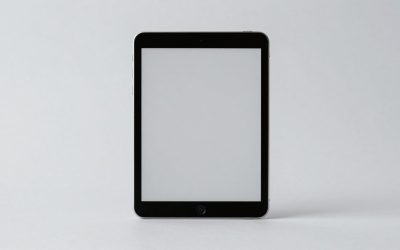
The best tablets for photo editing in 2026 are the 13-inch iPad Pro for serious Lightroom and Photoshop work, the iPad Air for most photographers, the Galaxy Tab S10 Ultra for a huge Android display, and the Surface Pro 11 for people who need full desktop software.
Quick picks by photographer and workflow
| Best for | Recommended tablet | Why it stands out | Main compromise |
|---|---|---|---|
| Professional editing and color-sensitive work | iPad Pro 13-inch with M4 chip | Excellent OLED contrast, strong processing power, Apple Pencil Pro support, and mature creative apps | High cost; accessories add considerably to the total |
| Best balance for most photographers | iPad Air 13-inch with M2 chip | Large color-accurate display, fast performance, and access to Lightroom and Photoshop | LCD contrast is below the iPad Pro’s OLED panel |
| Large-screen Android editing | Samsung Galaxy Tab S10 Ultra | 14.6-inch AMOLED display, included S Pen, microSD expansion, and excellent multitasking | Very large to hold and less consistent app optimization than iPadOS |
| Desktop Photoshop, plug-ins, and file-heavy work | Microsoft Surface Pro 11 | Runs Windows applications and supports a detachable keyboard and Slim Pen | Pen and keyboard may be separate purchases; Windows tablet apps can feel less touch-friendly |
| Lower-cost mobile editing | iPad 10th generation or a midrange Android tablet | Good for selects, crops, exposure adjustments, and social-media exports | Less storage and headroom for large RAW catalogs |
What matters most when choosing a photo-editing tablet
Display quality: size is not the same as accuracy
A tablet should show shadow detail without making every image look artificially vivid. Look for a panel with wide-gamut color support, high brightness, good viewing angles, and a resolution of at least about 250 pixels per inch. OLED and AMOLED displays provide deeper blacks and strong contrast, which helps when judging night photographs, but their punchy appearance can encourage overly dark edits. A quality LCD can be more predictable and is often less expensive.


TourBox NEO - Editing Controller, Desktop Creative Multi-Control, Wired
Chosen because it specifies Editing Controller and Desktop Creative Multi-Control.
View on Amazon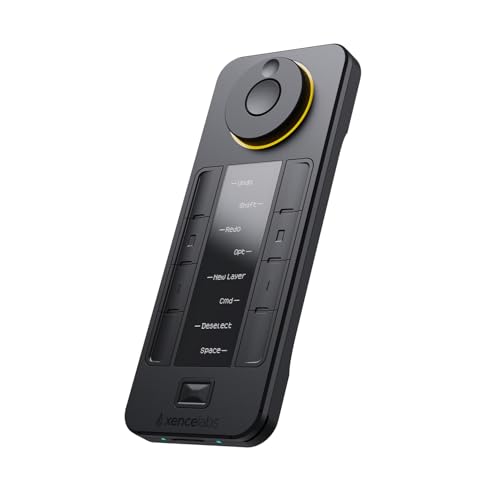
XENCELABS Quick Keys for PC, MacBook, Desktop, Drawing Tablet, Pen Display, OLED Display, 44 Customizable Shortcuts Keydail for Digital Drawing, Video Editing, Photo Retouching, Windows/macOS
Chosen because it specifies MacBook and Desktop.
View on AmazonA 11-inch tablet is easier to carry and works well on a small desk. A 12.9- to 14.6-inch model gives Lightroom Classic-style panels, layers, and side-by-side references more breathing room. Before buying the largest screen, check the physical footprint: a 13-inch tablet is typically about 11 inches wide, while a 14.6-inch model can approach 13 inches wide. Add another 1 to 2 inches for a protective case and room for your hands.
| Tablet size | Typical footprint with case | Comfortable use | Desk or travel reality |
|---|---|---|---|
| 10–11 inches | 10–11.5 inches wide | One-handed browsing, culling, and quick edits | Fits most small bags and a 24-inch-wide desk area |
| 12.9–13 inches | 11–12.5 inches wide | Detailed masking, retouching, and split-screen work | Needs a firm stand; comfortable on a 30-inch-deep desk |
| 14–14.6 inches | 12.5–14 inches wide | Large timelines, multiple panels, and image comparisons | Better as a portable workstation than a handheld tablet |
Stylus support and palm rejection
For masking skies, removing distractions, painting local adjustments, or placing precise healing strokes, a pressure-sensitive pen is more useful than a faster processor. Apple Pencil Pro works with compatible iPad Pro and iPad Air models and adds pressure sensitivity, tilt, hover, and shortcut controls. Samsung includes an S Pen with the Galaxy Tab S10 Ultra, which makes it a strong value for annotation and brush-based editing. Surface Pro models support Microsoft’s Slim Pen, although the pen is commonly sold separately.
Check whether the editing app recognizes pressure and tilt, rather than assuming every stylus feature works everywhere. A pen also needs somewhere safe to live. Magnetic charging is convenient, but a case with a pen loop is more practical for photographers moving between a studio, location, and café.
Processing power: prioritize sustained performance
Photo editing benefits from a capable processor when generating previews, applying AI masks, exporting large JPEGs, or working with many layers. Apple’s M2 and M4 chips have ample performance for mobile Lightroom, Photoshop, Affinity Photo, and video-assisted workflows. Samsung’s high-end Snapdragon platform handles RAW editing and multitasking well, while the Surface Pro 11 is the better choice when you require Windows-only software.
RAM affects how comfortably a tablet keeps several large documents open. For regular RAW editing, 8GB is workable; 12GB or more is preferable for large panoramas, layered composites, and frequent multitasking. A faster chip cannot compensate for an app that lacks the features you need, so software compatibility should come before benchmark numbers.
Storage, catalogs, and app compatibility
Choose at least 256GB if the tablet will hold current RAW shoots. A 512GB model is safer for photographers who keep several assignments offline. A 1TB configuration makes sense for extensive local libraries, but external storage is often more economical.
- iPadOS: Excellent support for Lightroom, Photoshop, Capture One for iPad, Affinity Photo, and Procreate. USB-C external drives work, but iPadOS file handling is not identical to macOS.
- Android: Lightroom, Photoshop, Snapseed, and other editing apps are available, and the Galaxy Tab S10 Ultra adds microSD expansion. Feature parity and interface refinement can vary by app.
- Windows: Best for full desktop Photoshop, Lightroom Classic, plug-ins, tethering utilities, and specialized workflow tools. Battery life and touch controls depend more heavily on the exact configuration.
As a practical guide, a single 24-megapixel RAW file may occupy roughly 25–40MB, while a layered Photoshop document can become several hundred megabytes. A 256GB tablet does not provide 256GB of working space after the operating system, apps, cache files, and backups. Plan to keep finished projects on an external SSD or cloud service rather than treating the tablet as your only archive.
Head-to-head: iPad Pro versus iPad Air
The 13-inch iPad Pro is the better choice when display contrast, responsiveness, and sustained performance justify the premium. Its OLED screen is especially appealing for photographers who routinely work in dim environments or inspect fine tonal transitions. The iPad Air 13-inch delivers most of the practical editing experience for less money, with enough power for RAW development, masking, and high-resolution exports.
Choose the Pro if you edit daily, use complex layered files, or want the most polished pen-and-display combination. Choose the Air if you want a large screen for travel and client previews but would rather put the savings toward an Apple Pencil, keyboard, calibrated desktop monitor, or external SSD. In general, a 256GB or 512GB Air is a more sensible purchase than a Pro with too little storage.
Where the Galaxy Tab S10 Ultra and Surface Pro 11 fit
The Galaxy Tab S10 Ultra is the most spacious option for Android users. Its 14.6-inch AMOLED display is excellent for viewing images at a generous size, and the included S Pen reduces the accessory cost. It is particularly attractive if you already use Android, Samsung Notes, Google Photos, or a microSD-based file workflow. Its width and weight make a stand almost essential for long editing sessions.
The Surface Pro 11 is less like a large phone and more like a thin Windows computer with a removable keyboard. It is the strongest pick for photographers who depend on desktop plug-ins, Lightroom Classic catalogs, Windows color-management tools, or tethering software. Check software compatibility carefully when choosing an ARM-based configuration, especially for older plug-ins and specialist hardware drivers.
Decision matrix for real-world use
| Your situation | Best direction | Recommended minimum specification |
|---|---|---|
| Small apartment or shared desk | 11-inch iPad Air or comparable compact tablet | 8GB RAM, 256GB storage, USB-C, 11-inch display |
| Frequent travel and location shoots | 11-inch iPad Air or iPad Pro | Under roughly 1.5 lb, cellular optional, rugged case, 256GB storage |
| Kids, pets, or rough camera-bag conditions | Midrange tablet with a replaceable protective case | At least 256GB, reinforced corners, screen protector, cloud backup |
| Desktop plug-ins and tethered shooting | Surface Pro 11 or another Windows 2-in-1 | 16GB RAM, 512GB SSD, full-size USB support through a hub if needed |
| Back, wrist, or neck discomfort | 12.9- to 13-inch tablet on a stand rather than a larger handheld model | Adjustable stand, viewing angle near eye level, external keyboard optional |
Moving, charging, and durability realities
A large tablet may weigh around 1.3–1.7 lb before adding a case, keyboard, and charger. A keyboard case can push the carry weight close to that of a small laptop. For a doorway, shelf, or camera bag, allow at least 1 inch of clearance beyond the tablet’s cased width and avoid packing it tightly against lenses or metal accessories that could press into the screen.
For desk editing, place the tablet on a stand with the top edge slightly below eye level and keep the display roughly 18–28 inches from your face. This reduces neck bending and leaves room for a card reader or external SSD. What usually wears first is not the processor but the charging cable, keyboard hinge, case corners, and stylus tip. A case that protects the ports and a short, flexible USB-C cable can prevent more inconvenience than a premium specification upgrade.
Final buying recommendation
For most photographers, the 13-inch iPad Air with 256GB or 512GB storage and a compatible Apple Pencil is the best balance of display size, performance, app support, and portability. Move up to the 13-inch iPad Pro if color contrast and intensive layered work are central to your business. Choose the Galaxy Tab S10 Ultra for the largest Android canvas and expandable storage, or the Surface Pro 11 when full desktop Windows software matters more than a pure tablet experience.