Key takeaways
- Footprint and Surface Coverage: Every accessory you clamp, mount, or place on a standing desk shares a limited stage. Measure your available depth and width before buying. A converter that overhangs by even an inch creates visual imbalance and can throw off the weight distribution of your entire setup.
- Cord Management and Power Access: Cluttered cables don’t just look chaotic — they scatter light in unpredictable directions and make a space feel smaller. Prioritize power strips and organizers that mount flush to the desk edge or tuck underneath, keeping the sightlines clean.
- Under-Desk Clearance: Standing desk users swap between sitting and standing constantly. Any storage shelf, laptop holder, or accessory mounted below the surface needs to clear your knees in both positions. Check vertical clearance with the desk at its lowest and highest points.
- Material Quality and Fatigue Resistance: A mat that deforms after two months or a clamp strip with loose USB ports defeats the purpose. Look for dense foam constructions in mats and metal-housing surge protectors that won’t flex or overheat with daily use.
- Aesthetic Cohesion: Your desk accessories should read as a unified system, not a grab bag. Match matte finishes to matte finishes, keep color temperatures consistent, and avoid mixing too many accent colors — it quietly drains the energy from a room.
What's inside
Most standing desk setups look great in a showroom photo and feel hollow the moment you actually work at them for eight hours. The light bounces harshly off a bare desktop, cables tangle into visual noise, and your feet start throbbing on a floor that was never meant for standing. The problem isn’t the desk itself — it’s the ecosystem around it, the accessories that determine whether the workspace feels intentional or improvised.
This guide takes that ecosystem seriously. I’ve evaluated six standout accessories through the lens of how they affect the entire sensory experience of a standing workstation — from surface texture underfoot to the way a power strip either disappears into the desk edge or becomes an eyesore. Every pick here was chosen for how it contributes to a workspace that actually sustains focus and comfort through a full day.
As an Amazon Associate we earn from qualifying purchases.



🛒 Best Price Today on Amazon
Prime members get fast, free shipping on everything above, plus member-only deals. New members get a 30-day free trial — cancel anytime.
How to Choose Standing Desk Accessories (2026)
- Footprint and Surface Coverage: Every accessory you clamp, mount, or place on a standing desk shares a limited stage. Measure your available depth and width before buying. A converter that overhangs by even an inch creates visual imbalance and can throw off the weight distribution of your entire setup.
- Cord Management and Power Access: Cluttered cables don’t just look chaotic — they scatter light in unpredictable directions and make a space feel smaller. Prioritize power strips and organizers that mount flush to the desk edge or tuck underneath, keeping the sightlines clean.
- Under-Desk Clearance: Standing desk users swap between sitting and standing constantly. Any storage shelf, laptop holder, or accessory mounted below the surface needs to clear your knees in both positions. Check vertical clearance with the desk at its lowest and highest points.
- Material Quality and Fatigue Resistance: A mat that deforms after two months or a clamp strip with loose USB ports defeats the purpose. Look for dense foam constructions in mats and metal-housing surge protectors that won’t flex or overheat with daily use.
- Aesthetic Cohesion: Your desk accessories should read as a unified system, not a grab bag. Match matte finishes to matte finishes, keep color temperatures consistent, and avoid mixing too many accent colors — it quietly drains the energy from a room.
The Best Standing Desk Accessories (2026) Reviewed
FITUEYES 32″ Sit to Stand Converter
This compact riser converts any existing desk into a dual-monitor standing station without requiring a full furniture overhaul. The 32-inch width keeps the footprint tight, which matters when you’re trying to preserve ambient light reaching the back of your desk. Assembly is genuinely straightforward — under ten minutes — and the pneumatic lift mechanism moves smoothly without the jarring bounce that cheaper converters exhibit.
Anker Nano Power Strip
The Anker Nano is the kind of accessory that disappears into a setup, and that’s precisely the compliment. The 70W desk-clamp design with 1500J surge protection secures to tabletop edges between 0.6 and 1.8 inches thick, keeping six AC outlets and two USB-C ports within arm’s reach without stealing any desktop real estate. For a workspace where visual calm matters, having power integrated this cleanly makes a measurable difference in how settled the desk feels.
CCCEI 15-Outlet Desk Clamp Strip
Where the Anker Nano favors minimalism, the CCCEI goes maximal — 15 outlets, fast-charging USB-A and USB-C ports, and a 6-foot flat plug that runs flush along the wall. It fits tabletops up to 1.6 inches thick and mounts to the desktop edge, keeping everything within reach but off the work surface. If you run multiple monitors, a laptop, and a desk lamp simultaneously, this strip eliminates the power anxiety that fragments your workflow.
Topo Mini by Ergodriven
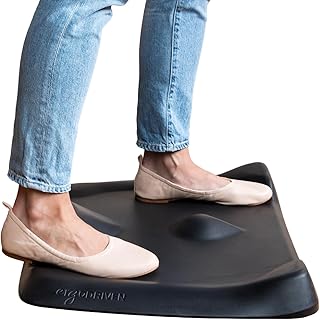
Ergodriven’s Topo Mini is an anti-fatigue mat engineered with calculated terrain — subtle raised contours that encourage micro-movements in your feet and legs throughout the day. The dense premium foam contains no PFAs or PVC, and the Obsidian Black finish absorbs light rather than reflecting it, which keeps the floor area visually grounded. At a smaller size than the original Topo, it works well under compact standing stations without dominating the room’s floor plane.
FITUEYES 36″ Sit to Stand Converter
The 36-inch FITUEYES riser gives you four extra inches of width over the 32-inch model, enough breathing room for a laptop alongside a full-size monitor without crowding. That additional width also changes how the desk reads visually — the broader platform creates a stronger horizontal line that anchors the workspace against the vertical movement of the sit-to-stand mechanism. Same easy assembly, same smooth lift, just a more commanding presence on the desktop.
Frequently Asked Questions
Do I need a standing desk converter if I already have an electric sit-stand desk?
A converter adds a second tier of adjustable height, which is useful if you want to elevate a monitor independently of your keyboard surface. If your electric desk already reaches the right standing height for your eye line, you likely don’t need one. But if your desk’s maximum height still forces you to look down at a screen, a converter solves that neck-strain problem without replacing the desk.
How thick should an anti-fatigue standing mat be?
Look for mats at least 0.75 inches thick with a density rating that resists bottoming out under your body weight. Ultra-thin mats compress flat within weeks and stop providing meaningful cushioning. The Topo Mini’s premium foam is a good benchmark — dense enough to support extended standing without becoming a squishy, unstable surface.
Can I use a desk-clamp power strip on a glass-top desk?
Most desk-clamp power strips, including the Anker Nano and CCCEI models listed here, require a solid edge between roughly 0.4 and 2.2 inches thick. Glass desks with polished or thin edges may not provide enough grip or may risk cracking under clamp pressure. Check the clamp’s compatibility range against your specific desktop material before purchasing.
What’s the ideal desk depth for a standing desk setup?
For dual monitors and a keyboard, aim for at least 24 inches of usable depth. This keeps the screen at a comfortable arm’s-length distance — roughly 20 to 26 inches from your eyes — while leaving room for a keyboard tray or mat. Deeper desks (30 inches or more) allow you to push monitors back, which reduces glare and creates a more relaxed visual focal point.
Final Thoughts
The accessories that genuinely transform a standing desk aren’t always the most expensive ones — they’re the ones that make the whole workspace feel considered. For most people, the Ergodriven Topo Mini mat delivers the single biggest day-to-day comfort upgrade, while the Anker Nano power strip quietly eliminates the cable mess that undermines an otherwise clean setup. If you need the extra surface space to properly position dual monitors at the right height, the FITUEYES 36″ converter is the riser that earns its footprint. Build from these three outward and the rest of the accessories fall into place.