Key takeaways
- Depth before width: Width gets the attention, but depth sets your viewing distance. Anything under 24 inches forces screens close enough that peripheral panels sit outside your comfortable gaze cone and their light hits your eyes at a steep angle. Around 30 inches lets you push a triple setup back and dial brightness down.
- Surface finish and bounce: Matte or lightly textured laminate scatters light; high-gloss and dark-glass tops act like mirrors for ceiling fixtures. Mid-tone woods such as oak and rustic brown are forgiving because they diffuse without swallowing all the fill light your hands need.
- Riser and shelf geometry: Monitor stands that lift screens two to four inches usually put the top edge at brow height, which is where you want it. Just check that a riser doesn’t block the wall you plan to use for bias lighting behind the panels.
- Integrated LEDs, judged honestly: Built-in strips are decorative when they face outward and genuinely useful when they wash a wall or the underside of a shelf. Look for dimmable warm options, not just saturated color cycling, and treat presets as a bonus rather than a reason to buy.
- Power and cable discipline: Onboard outlets and USB ports keep lamp cords, monitor bricks, and hubs off the floor. A tidy cable path also means you can add a bias light or a low-glare task lamp later without rerouting the whole desk.
What's inside
Most multi-monitor complaints get blamed on the desk when the real culprit is the light landing on it. Two or three panels throw a wide wash of blue-white light across a small area, and if the surface underneath is glossy, that light bounces straight back into your eyes as a low-grade haze you stop noticing but never stop reacting to. Add a window at three o’clock, a ceiling fixture directly overhead, and a desk too shallow to push screens past arm’s reach, and you get the familiar late-afternoon squint: pupils fighting a bright panel against a dark wall, neck creeping forward, contrast sensitivity dropping by the hour.
I light rooms for a living, and desks are the trickiest surfaces I deal with because they are simultaneously a work plane, a reflector, and a mount for the brightest object in the room. This guide looks at multi-monitor desks through that lens: how deep the top is, how the finish handles bounce, whether integrated LEDs actually help your eyes or just look good in photos, and how riser height and cable routing let you balance screen brightness against the wall behind it. Below are six desks worth considering in 2026, followed by the specific things I check before recommending any of them.
As an Amazon Associate we earn from qualifying purchases.


🛒 Best Price Today on Amazon
Prime members get fast, free shipping on everything above, plus member-only deals. New members get a 30-day free trial — cancel anytime.
How to Choose a Home Office Desk For Multiple Monitors (2026)
- Depth before width: Width gets the attention, but depth sets your viewing distance. Anything under 24 inches forces screens close enough that peripheral panels sit outside your comfortable gaze cone and their light hits your eyes at a steep angle. Around 30 inches lets you push a triple setup back and dial brightness down.
- Surface finish and bounce: Matte or lightly textured laminate scatters light; high-gloss and dark-glass tops act like mirrors for ceiling fixtures. Mid-tone woods such as oak and rustic brown are forgiving because they diffuse without swallowing all the fill light your hands need.
- Riser and shelf geometry: Monitor stands that lift screens two to four inches usually put the top edge at brow height, which is where you want it. Just check that a riser doesn’t block the wall you plan to use for bias lighting behind the panels.
- Integrated LEDs, judged honestly: Built-in strips are decorative when they face outward and genuinely useful when they wash a wall or the underside of a shelf. Look for dimmable warm options, not just saturated color cycling, and treat presets as a bonus rather than a reason to buy.
- Power and cable discipline: Onboard outlets and USB ports keep lamp cords, monitor bricks, and hubs off the floor. A tidy cable path also means you can add a bias light or a low-glare task lamp later without rerouting the whole desk.
The Best Home Office Desk For Multiple Monitors (2026)s Reviewed
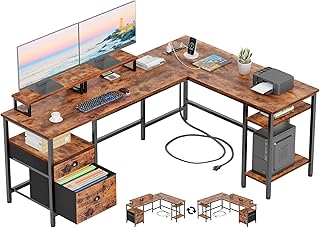
Furologee 66″ L Shaped Desk with Power Outlet
The corner layout is a quiet win for lighting because it lets you angle two monitors away from a window instead of facing it head-on, and the rustic brown finish keeps reflected glare soft. Onboard outlets, a file drawer, and dual monitor stands mean the surface stays clear enough for a proper task lamp.
55″ U Shaped Electric Standing Desk, White
The most ambience-aware desk here: ten LED modes, three height presets, and a dual-monitor stand on a wraparound top that surrounds you with work surface rather than pushing screens into your face. Point the LEDs at the wall, keep them warm and low, and you have built-in bias lighting that reduces the contrast gap behind your panels.
Grandder 55×32 Extra-Deep Electric Standing Desk
That 32-inch depth is the headline, and it matters more than any accessory: a 49-inch ultrawide plus a flanking screen can sit far enough back that you can drop panel brightness a step or two. The oak top diffuses overhead light nicely, and 176 pounds of capacity handles heavy VESA arms without wobble.
LVB 70.8″ Industrial Computer Desk
A long, uninterrupted plank is the easiest surface to light well, since there are no shelves casting hard shadows across your keyboard. The metal-and-wood build suits a two-person or wide triple-monitor layout, though you will want to add your own riser and clamp lamp.
Korfile 59″ L Shaped Computer Desk, Black
Strong storage-to-footprint ratio with four adjustable drawers, dual monitor stands, and integrated outlets in a reversible corner design. Because the finish is black, be deliberate about ambient fill so the desk doesn’t read as a dark void beneath bright screens.
Frequently Asked Questions
How deep should a desk be for three monitors?
Aim for 28 to 32 inches. Deeper tops let you curve the array around you so every panel sits roughly the same distance from your eyes, which keeps brightness and focus consistent across all three.
Do built-in LED desks actually reduce eye strain?
They can, if you use them as indirect light rather than decoration. A dim warm glow bouncing off the wall behind your monitors narrows the contrast gap your pupils have to negotiate; a saturated strip pointed at your face does the opposite.
Is a standing desk worth it with multiple monitors?
Yes, provided the frame is rated well above your total load. Changing height also changes your angle to windows and ceiling fixtures, so expect to nudge screen tilt slightly between sitting and standing positions.
Should I avoid glass or glossy desktops?
For multi-monitor work, generally yes. Glossy surfaces reflect overhead light into your lower field of view, and that low-level veiling glare is the kind of fatigue you feel without being able to name it.
Final Thoughts
If depth is your priority, the Grandder 55×32 gives you the most room to place screens at a comfortable distance and turn brightness down. For built-in ambience done properly, the 55″ U shaped standing desk offers dimmable, wall-washable light alongside real ergonomic adjustment. And if you want storage plus a glare-friendly finish in a corner footprint, the Furologee 66″ L shaped desk is the balanced pick.