A gaming setup usually gets its screen lighting sorted first, and the room itself stays an afterthought: one harsh ceiling light, or total darkness around a bright monitor. The real decision is how the whole corner or room should glow around it. Ambient light here means indirect, room-level light — a wash up a wall, color pooled in a corner, a soft field behind the screens — rather than another strip stuck to the back of a display.
This roundup is for PC players lighting a bedroom corner, console players with a TV wall, and streamers whose background sits on camera. Every pick below was chosen from the names and specification fields on its Amazon product page, and each one lights the room around the setup instead of the desk surface itself. Formats run from a tall floor lamp to a full LED curtain, so the shortlist works whether your setup fills a wall or just one corner.
Quick Picks
As an Amazon Associate we earn from qualifying purchases.
Product
Best for
Key spec from title
Philips Hue Signe Gradient Floor Lamp
A tall gradient wash in the corner beside a desk
Up to 2,500 lumens
Govee Curtain Lights Pro
A full animated wall of color behind the setup
960 LEDs across 5.41 x 5.77 feet
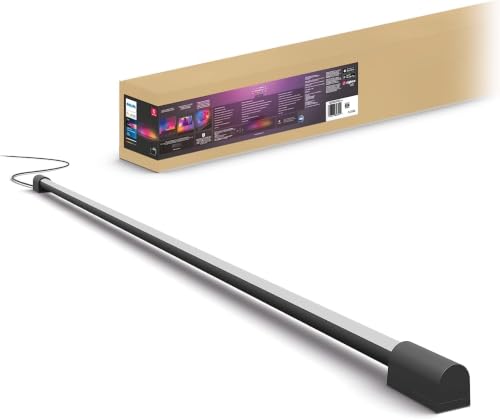
Philips Hue Play Gradient Light Tube, Large
A wide wash under or above a TV media wall
1,800 lumens
Govee Table Lamp 2
A compact glow on a shelf or side table
500 lumens, RGBICWW
Twinkly Dots, 200 LED
Outlining shelves, frames, and ceiling edges
200 LEDs on a 33-foot string
How to Choose
Aim the Light at Walls and Corners, Not at the Screen
Ambient light does its work by reflection. A lamp that throws color onto the wall behind or beside your setup softens the contrast between a bright display and a dark room, and it keeps direct glare out of your eyes. Before buying anything, stand where you sit and note which surfaces you actually see: the wall behind the monitor, the corner to one side, the ceiling above. A floor lamp suits a visible corner, a curtain suits a flat wall you face, and a tube suits the wall behind a TV. Buying a format that points at a surface you never look at is the most common way this kind of purchase disappoints.
Match the Format to the Surface You Have
Each format covers a different amount of wall. A single floor lamp paints one corner and the wall section above it. A light tube stretches a wash across the width of a media console. An LED curtain covers several square feet at once and becomes the backdrop itself, while a flexible dot string traces edges — shelving, a door frame, the line where wall meets ceiling. Measure the surface first. The curtain in this roundup spans more than five feet in each direction, which overwhelms a small desk nook but suits a full console wall. Small rooms usually do better with one lamp plus one accent than with a wall-sized piece.
Settle the Control Ecosystem Before the Hardware
These lights split into two camps. Hue products run on Bluetooth for a single room and unlock automations, away-from-home control, and screen syncing through a Bridge that is bought separately. Govee and Twinkly gear connects over Wi-Fi and leans on its own app for scenes, with Matter support appearing on newer models like the table lamp below. Mixing camps is fine visually, but every extra app is another place to build the same evening scene twice. If your home already runs one ecosystem, weighting the shortlist toward it saves real friction. If you are starting from zero, pick the camp whose other products you are most likely to add later.
Check Dimming Depth and White Range, Not Just Color Count
Every product here advertises millions of colors, which tells you almost nothing. What matters at 1 a.m. is how low the light goes and whether it can produce a calm warm white for winding down. Look for a stated white range — the table lamp below spans 2700K to 6500K — and for app dimming that reaches near-off without cutting out. Brightness ceilings matter less for ambient duty: even the 500-lumen lamp is plenty when its job is a shelf glow rather than task light. Animated scenes and music modes are pleasant extras, but the settings you will actually live with are two or three dim, steady scenes.
The 5 Best Options
Philips Hue Signe Gradient Floor Lamp
This slim floor lamp is the pick for a setup that has one good corner and nothing else. It stands about 57 inches tall, throws a gradient of several colors at once up the wall, and stays visually quiet when it is off — a thin black column rather than a glowing gadget. Because the light is indirect, it fills the corner behind a desk without shining into the screen or the player’s face. It suits PC corners and console side walls equally, and it is the easiest piece here to move when the room gets rearranged, since it simply stands on the floor and plugs in.
Specs
Brightness: up to 2,500 lumens
Wattage: 29 watts
Model: Gradient Signe, part number 569103
Shade height: 145.7 centimeters
Light: White and Color Ambiance with blended gradient colors
Control: Hue app and voice, with Bluetooth built in
Installation: freestanding, indoor use
Best for: a corner beside the desk that needs a tall, soft wash of color.
Watch out for: full automations and control of up to 50 lights need a Hue Bridge bought separately; Bluetooth alone covers up to 10 lights in one room.
ASIN: B09BDLV9BV
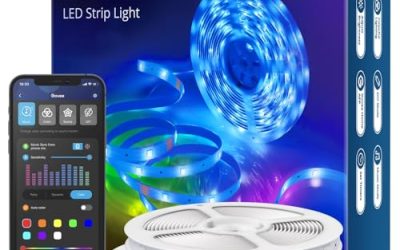
Govee Curtain Lights Pro
Top Pick
Govee Curtain Lights Pro
Best for: a full wall behind the setup that should glow as one animated surface.
Where the Signe paints a corner, this curtain turns an entire wall into the ambient layer. Its 960 LEDs hang in a grid a little over five feet wide and tall, and the app maps images and animated scenes across that grid, so the wall behind a console setup can idle on a slow color drift or a pixel-art scene. It is the strongest backdrop choice for streamers and for TV walls that sit empty between sessions. The curtain itself is rated IP67 for water resistance, and control runs through the Govee app or voice assistants over Bluetooth and Wi-Fi.
Philips Hue Play Gradient Light Tube, Large
Runner-Up
Philips Hue Play Gradient Light Tube, Large
Best for: console and TV walls that need one wide, even wash of color.
The light tube is a long, low cylinder made to wash the wall behind a big screen. It lies on a media console under the TV, stands beside it, or mounts above it, and its gradient output spreads color across the wall in a wide, even band. With 1,800 lumens it is bright enough to carry the ambient layer for a whole console wall on its own. As a static mood light it works from the Hue app straight away; its headline trick, syncing with what is on the TV or in a game, needs extra Hue hardware, which the listing states plainly in its own title.
Govee Table Lamp 2
Not every setup has a spare corner or a free wall. This small cylinder, under nine inches tall, puts the ambient layer on a shelf, a side table, or the end of a long desk, where it glows like a lantern rather than a fixture. Its RGBICWW array mixes color with dedicated warm and cool white, so the same lamp can idle at a warm 2700K after midnight or run one of its 64 or more preset scenes during a group session. Touch control on the lamp itself is genuinely useful here, because accent lights are the ones people adjust without reaching for a phone.
Specs
Brightness: 500 lumens
White range: 2700K to 6500K
Scenes: 64 or more preset modes, 8 music modes
Dimensions: 4.3 x 4.3 x 8.8 inches
Item weight: 1.8 pounds
Control: app, touch, and voice; Matter over Wi-Fi
Power: corded electric
Best for: a shelf or side table that needs a small, warm, self-contained glow.
Watch out for: it is corded with no battery, and 500 lumens accents one zone — it will not light a whole wall by itself.
ASIN: B0D41XL87F
Twinkly Dots, 200 LED
Twinkly Dots, 200 LED
Best for: outlining shelves, frames, and ceiling edges with a line of animated light.
outlining shelves, frames, and ceiling edges with a line of animated light.
Watch out for
availability on the listing shifts between sellers, so check the seller options on the page before ordering; USB power also means planning a port within reach of the run.
Dots take the opposite approach to the curtain: instead of a solid field, a flexible string of 200 small LEDs traces the edges of the room. Run it along a shelf line, around a poster frame, or where the wall meets the ceiling, and the setup gains a drawn outline of light that the Twinkly app can map and animate point by point. The string is USB powered, which makes it easy to run from a console or a spare port near the desk. It is the most playful format here and the easiest to reshape when the room changes.
Which One Fits Your Situation
A PC Desk in a Bedroom Corner
Start with the Signe floor lamp in the corner beside the desk, where its gradient wash fills the wall you face without touching the monitor. Add the Govee Table Lamp 2 on a shelf only if the room still feels flat on the far side. That pairing covers most single-desk rooms, and both pieces stay useful if the desk later moves to another wall.
A Console Setup on a Media Wall
The light tube belongs under or above the TV, washing the wall the screen hangs on. If the wall is wide and bare, the Govee Curtain Lights Pro is the alternative: it turns the whole surface into the ambient layer. Pick the tube for a calm, even glow and the curtain when the wall itself should be part of the entertainment.
A Streaming Corner That Sits on Camera
Backgrounds read flat on camera without depth, so combine two heights: the curtain or a Signe behind you for the main field of color, and Twinkly Dots tracing a shelf or frame edge for detail. Keep brightness modest — cameras exaggerate hot spots — and favor slow, steady scenes over fast animations while you are live.
A Rental Room With No Drilling Allowed
Everything here avoids screws except an optionally mounted light tube, so renters are well covered. The Signe stands on its own, the table lamp sits on furniture, and the Dots string follows edges with light fixing. Build the setup from those three and the room keeps its deposit-safe walls while still gaining a full ambient layer.
Common Mistakes
Buying a second monitor backlight and calling it ambient light, when the room itself stays dark and harsh around the setup.
Covering the biggest wall with an LED curtain in a small room, leaving the glow overpowering at normal viewing distance.
Mixing three control ecosystems at once, then rebuilding the same evening scene in three different apps every night.
Judging ambient lights by maximum brightness instead of how smoothly and how low they dim for late sessions.
Running every light on fast animated scenes, which distracts during play and looks chaotic on a stream camera.
Frequently Asked Questions
Does ambient light actually help during long gaming sessions?
It mainly helps with contrast. A soft wash on the wall around your screen narrows the gap between a bright display and a dark room, which many players find more comfortable over hours. It will not fix a badly positioned monitor or a screen set far too bright, so treat room light as one part of the setup rather than a cure on its own.
Can I mix Hue, Govee, and Twinkly lights in one setup?
Yes, and the color fields will sit happily side by side, but each brand keeps its own app and scene list. The practical approach is to choose one brand for the main ambient layer and use a second brand only for a distinct accent, such as a dot outline. Voice assistants can still switch the whole room on and off across brands.
Do these lights need Wi-Fi to work?
Not always. The Hue pieces run over Bluetooth in a single room without any network, and the Govee table lamp keeps touch control on the lamp itself. Wi-Fi becomes necessary for app scenes at range, schedules, and music sync features. If your router sits far from the gaming room, favor the Bluetooth-capable picks and test signal strength before committing to a wall-sized piece.
Where should ambient light go in a small gaming room?
One corner and one edge is usually enough. A floor lamp in the corner beside the desk covers the wall you face, and a short run of Dots along a shelf adds the second layer. Adding a third source in a small room tends to flatten everything into uniform brightness, which removes the depth that makes ambient lighting look good in the first place.
H
Home Beautiful Design Editorial Team
We compare specs, materials and verified owner reviews before a product earns a spot. Rankings are never paid.
Affiliate disclosure. As an Amazon Associate we earn from qualifying purchases at no extra cost to you. Prices accurate as of the date shown.
Compare five smart power strips with energy monitoring from Kasa, Tapo, GHome, Eve and APC, with per-outlet or whole-strip tracking and surge protection.