Key takeaways
- Surface sheen over surface colour: A matte or lightly textured top scatters light instead of throwing it back at your screen. High-gloss white and lacquered black are the two worst offenders under any downlight, so if you love the look, plan on side lighting rather than overhead.
- Height that puts glare behind you: Your screen picks up whatever sits in front of it. Adjustable-height desks let you raise the laptop until the window or lamp falls out of the reflection angle, which fixes more eye strain than any blue-light filter.
- Where the light lands on your hands: Keyboard shadow is the most common complaint I hear and the easiest to solve. Look for open frames, keyboard trays that sit clear of overhangs, and enough depth to place a small lamp at 10 or 2 o’clock without knocking it over.
- Integrated lighting worth having: Built-in LEDs earn their place when they are diffused, dimmable, and pointed at the wall rather than your eyes. Treat a strip aimed straight out from the desk edge as ambience only, never as your task light.
- Power near the light, not across the room: USB ports and outlets on the desk mean your lamp, laptop, and charger share one tidy run. Fewer cables crossing the floor means fewer reasons to leave a bad overhead on because the nice lamp is unplugged.
What's inside
Most laptop desks are bought in daylight and used after dark. That gap is where the regret lives: a surface that looked crisp in a showroom photo turns into a mirror under a ceiling fixture, a rolling cart parks perfectly but leaves your keyboard in the shadow of your own shoulders, and a glossy white top bounces so much lamp glare up into the screen that you end up cranking brightness and paying for it around hour three. As someone who spends their working life aiming light at surfaces, I can tell you the desk is not a neutral participant. It is a reflector, and you are choosing what it reflects.
This guide looks at six laptop desks the way I would light a room: finish and sheen first, then how the geometry positions your screen relative to your existing fixtures, then whether built-in illumination is genuinely useful or just decoration. Every pick below is judged on how it behaves at 9pm, not just at noon.
As an Amazon Associate we earn from qualifying purchases.


How to Choose a Laptop Computer Desk (2026)
- Surface sheen over surface colour: A matte or lightly textured top scatters light instead of throwing it back at your screen. High-gloss white and lacquered black are the two worst offenders under any downlight, so if you love the look, plan on side lighting rather than overhead.
- Height that puts glare behind you: Your screen picks up whatever sits in front of it. Adjustable-height desks let you raise the laptop until the window or lamp falls out of the reflection angle, which fixes more eye strain than any blue-light filter.
- Where the light lands on your hands: Keyboard shadow is the most common complaint I hear and the easiest to solve. Look for open frames, keyboard trays that sit clear of overhangs, and enough depth to place a small lamp at 10 or 2 o’clock without knocking it over.
- Integrated lighting worth having: Built-in LEDs earn their place when they are diffused, dimmable, and pointed at the wall rather than your eyes. Treat a strip aimed straight out from the desk edge as ambience only, never as your task light.
- Power near the light, not across the room: USB ports and outlets on the desk mean your lamp, laptop, and charger share one tidy run. Fewer cables crossing the floor means fewer reasons to leave a bad overhead on because the nice lamp is unplugged.
The Best Laptop Computer Desks (2026) Reviewed
Adjustable Lap Desk for Bed with USB Port
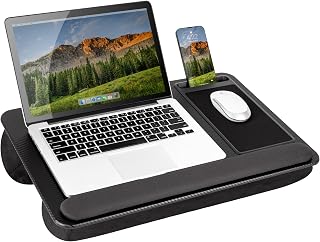
The 23.6″ x 15.7″ top and tilting height make this the most controllable option for bedroom use, because you can angle the screen out of your bedside lamp’s reflection instead of rearranging the room. The non-slip matte black finish is genuinely low-sheen, and the onboard USB port means a small clip-on light can run off the same desk rather than trailing a cable across the duvet.
Mount-It! Rolling Laptop Desk
A 29.6″ to 44.2″ range covers seated and standing, and on castors it becomes a light-chasing tool: roll it to the window in the morning, roll it beside a floor lamp at night. The 23.6″ x 20.5″ desktop is deep enough to keep a task lamp behind the laptop, which is the placement that kills keyboard shadow.
Tangkula Computer Desk with Bookshelf
The natural wood finish is the quiet star here, softening and warming reflected light in a way no painted surface manages. Shelving and a CPU stand keep the footprint compact, though the vertical bookshelf can cast a wedge of shade across one side of the desk, so light it from the shelf side.
Lufeiya White Computer Desk with LED Lights and Outlets
The LEDs and charging station make this a tidy all-in-one for a small room, and the monitor stand lifts your screen clear of most low lamp reflections. Be aware that a 40-inch white top is a reflector by nature: run the built-in lighting warm and low, and skip a bright ceiling fixture directly above it.
DurayLoly 40″ Small Gaming Desk with RGB Lights
The remote-controlled full-colour strip is the best-behaved integrated lighting in this group, mainly because the multiple modes let you settle on a dim, static wash instead of a moving rainbow. Set it as a bias glow behind the desk, add a separate task lamp for homework, and it handles both the gaming look and eye comfort.
Frequently Asked Questions
Do RGB desk lights actually reduce eye strain?
Indirectly, yes. Any light that raises the brightness of the wall behind your screen reduces the contrast your eyes have to fight, which is why bias lighting works. A colour-cycling strip pointed at your face does the opposite.
Is a white desk a bad idea?
Not bad, just demanding. White tops throw light upward into the screen, so pair them with side or wall-bounce lighting rather than a fixture directly overhead.
Where should a desk lamp sit for laptop work?
Slightly behind and to the side of the screen, aimed down at the keyboard and papers. Beside or in front of the laptop puts the source in your screen’s reflection zone.
Are rolling desks stable enough for standing work?
The better ones are, within their weight limits. The BONTEC mobile standing desk with keyboard tray handles up to 33lbs and locks in place, which is plenty for a laptop and a small lamp.
Final Thoughts
If you want one desk that plays nicely with whatever lighting you already own, the Tangkula bookshelf desk’s warm matte wood is the safest surface here. For flexibility, the Mount-It! rolling desk lets you move to the good light instead of fixing the bad light, and the DurayLoly RGB desk is the pick if you want built-in ambience that can be dialled down to something genuinely restful.