Key takeaways
- Rigidity over raw capacity: Weight ratings tell you what the motors can raise, not what stays still. Four columns with a full perimeter frame resist the lateral sway that makes monitor-mounted lights and camera setups visibly shudder, so prioritise frame architecture over headline poundage.
- Surface finish and reflection: Glossy laminates bounce ceiling light straight into your eyeline and create bright hotspots beside the screen. A matte or lightly textured top absorbs stray spill and keeps contrast comfortable, especially in rooms lit from above.
- Cable management depth: Ambience builds mean extra hardware: strip drivers, controllers, a hub, sometimes a small power distribution block. Look for wide trays or channels that swallow all of it without forcing you to drape cords where light will catch them.
- Height range in your actual room: Check the top of the range against your pendant or shelf-mounted lights. A desk that tops out at 48 inches can put your monitor uncomfortably close to a low fixture, which is a lighting problem no ergonomic setting will solve.
- Quiet motors and mounting points: Anything above roughly 55 dB becomes intrusive in a calm, dim workspace. Also check the underside for accessible steel faces — those are where under-desk lighting, clamps, and diffusers actually attach.
What's inside
Anyone who works under carefully placed light knows the frustration: you dial in a beautiful pool of warm illumination over the desktop, raise the desk eight inches to stand, and the whole scene falls apart. Key light now rakes across your keyboard at the wrong angle, the monitor picks up a hot reflection from the ceiling fixture, and the under-desk glow you spent an evening aligning is suddenly washing the wall instead of the floor. Height-adjustable desks change your position relative to every light source in the room, and most four-leg frames were engineered with zero thought given to that relationship. Add the usual complaint — a two-leg desk that shivers whenever you type, turning any bias-lit monitor into a faintly trembling rectangle — and the case for a properly braced four-leg platform becomes hard to argue with.
This guide looks at six of the strongest four-leg standing desks and frames available going into 2026, judged not only on lift capacity and motor quality but on how well they behave as part of a lit environment: finish reflectivity, cable routing generous enough for LED runs and power bricks, crossbar geometry that gives you something to mount to, and the kind of rigidity that keeps a strip light from rattling in its channel. Complete desks and bare frames are both covered, since some of the best ambience builds start with a frame and a slab you finish yourself.
As an Amazon Associate we earn from qualifying purchases.


How to Choose a/an 4 Leg Standing Desk (2026)
- Rigidity over raw capacity: Weight ratings tell you what the motors can raise, not what stays still. Four columns with a full perimeter frame resist the lateral sway that makes monitor-mounted lights and camera setups visibly shudder, so prioritise frame architecture over headline poundage.
- Surface finish and reflection: Glossy laminates bounce ceiling light straight into your eyeline and create bright hotspots beside the screen. A matte or lightly textured top absorbs stray spill and keeps contrast comfortable, especially in rooms lit from above.
- Cable management depth: Ambience builds mean extra hardware: strip drivers, controllers, a hub, sometimes a small power distribution block. Look for wide trays or channels that swallow all of it without forcing you to drape cords where light will catch them.
- Height range in your actual room: Check the top of the range against your pendant or shelf-mounted lights. A desk that tops out at 48 inches can put your monitor uncomfortably close to a low fixture, which is a lighting problem no ergonomic setting will solve.
- Quiet motors and mounting points: Anything above roughly 55 dB becomes intrusive in a calm, dim workspace. Also check the underside for accessible steel faces — those are where under-desk lighting, clamps, and diffusers actually attach.
The Best 4 Leg Standing Desk (2026)s Reviewed
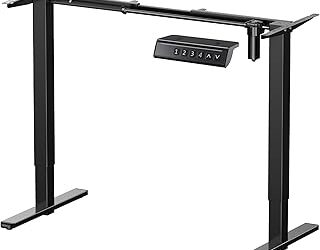
4-Leg Electric Frame, Dual Motor, 264 lbs
A properly heavy-duty frame that holds multi-monitor arrays and a full tower without the flex that ruins precise light placement. Because it ships bare, you choose your own top, which is the cleanest route to a genuinely non-reflective surface.
X-Win 71″ Electric Standing Desk
The 71-inch span gives you room to separate work zone from lighting zone, so a key light or diffuser panel can sit well outside your typing area. Four legs keep that longer top from developing the mid-span bounce common to wide two-leg designs.
FLEXISPOT 4-Leg Standing Desk, 55″x28″
FLEXISPOT’s build quality shows in the smoothness of the lift and the usefulness of its memory-preset LED controller, which lets you return to a height you have already light-mapped. The black finish stays visually recessed in low-light rooms rather than drawing the eye.
4 Leg Standing Desk Large, 55×28
A sensible mid-size option with a spliced board top and a solidly braced four-leg base. It suits smaller studies where the desk sits close to a wall-mounted fixture and stability matters more than sheer footprint.
JWX 4-Leg Frame, Dual Motor, 330 lb
The 330-pound rating is the most generous here, and that surplus translates directly into stillness under load — worth a great deal if you run camera arms, monitor lights, or a heavy slab top. Pair it with a wide hardwood or matte laminate surface and the result feels architectural.
Frequently Asked Questions
Do four legs really reduce wobble?
Yes, meaningfully. Two-leg desks resist front-to-back movement well but twist side-to-side; a four-column frame closes that loop and cuts the sway that makes mounted lights and screens visibly vibrate.
Can I fit LED strips to these frames?
Most four-leg frames offer flat steel undersides and crossbars that take adhesive channels or magnetic mounts easily. Frame-only options like the ErGear legs give the clearest access, since you are not working around a pre-drilled factory top.
How do I stop monitor glare when standing?
Reposition your ambient light rather than your screen. Indirect uplighting or a wall-bounced source stays glare-free across the whole height range, whereas a single downward fixture will always reflect at some seated or standing position.
Should I buy a frame or a complete desk?
Buy a complete desk for speed and a matched finish. Choose a frame — the JWX or ErGear, for example — when surface material, reflectivity, and depth are things you want to control precisely.
Final Thoughts
For most home offices the FLEXISPOT 4-Leg Standing Desk is the balanced choice, offering dependable lift, memory presets, and a finish that behaves well under artificial light. If you are building a lighting-aware setup from scratch, the JWX 330 lb frame gives you the rigidity and headroom to mount whatever you like, while the X-Win 71″ suits anyone who needs a genuinely wide surface with no mid-span flex.