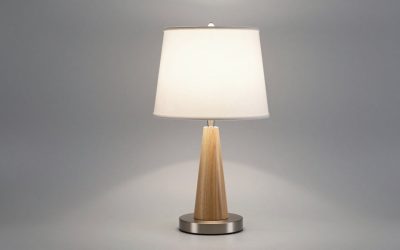
The Sailstar Wireless Charging Desk Lamp with USB port and pen holder is the best overall pick, with the JOSTIC LED Desk Lamp with Wireless Charger as the runner-up. Sailstar wins on light quality and a genuinely tidy footprint; JOSTIC delivers nearly the same feature set for less shelf presence and less money.
As a lighting-and-ambience designer, I see the same problem in almost every home office I walk into: a desk lit like a warehouse, with three chargers snaking across it. A charging desk lamp should solve both issues at once — pooling warm, glare-free light exactly where your hands work, while quietly absorbing the cable clutter into its base. The trouble is that many models chase spec-sheet features (clocks, thermometers, alarms) and forget the light itself. This guide evaluates six popular charging lamps the way a designer would: beam shape, color temperature range, dimming smoothness, base footprint, and whether the charging pad actually holds a phone at a readable angle.
Our top picks




As an Amazon Associate we earn from qualifying purchases at no extra cost to you.
Quick Comparison
| Product | Best For | Standout Feature | Rating |
|---|---|---|---|
| Sailstar Wireless Charging Desk Lamp | All-round desk lighting | Matte black finish with integrated pen holder | See live rating |
| JOSTIC LED Desk Lamp with Wireless Charger | Budget-conscious buyers | Eye-care diffusion at a low price | See live rating |
| BOHON Desk Lamp with USB C+A Ports | Multi-device desks | Dual USB-C and USB-A plus sleep timer | See live rating |
| LAOPAO Desk Lamp with Wireless Charger & Clock | Dorm rooms and small spaces | Clock display built into a compact base | See live rating |
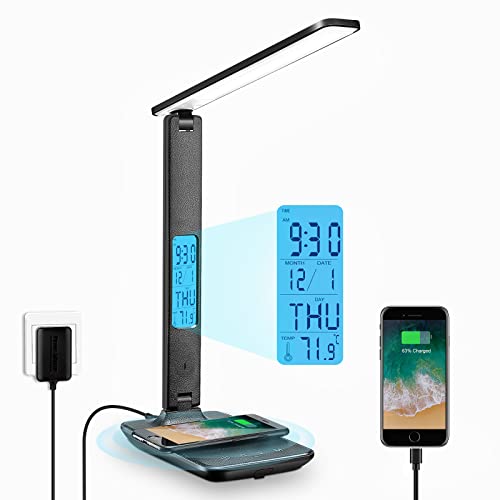
| XIZDDL LED Desk Lamp with Wireless Charger | Data-loving home offices | Clock, calendar, thermometer and auto-timing | See live rating |
How to Choose a Desk Lamp with USB Charging Ports and a Wireless Charging Pad
- Beam shape over raw brightness: A wide, bar-style LED head spreads light across a keyboard and notebook evenly. Narrow spot heads create hot spots and hard shadows that tire your eyes faster than a dimmer, broader source.
- Color temperature range: Look for at least three modes spanning roughly 3000K to 5500K. Warm light for evening wind-down, neutral for reading, cool for detail work — one fixed tone will always fight the room’s ambience.
- Charging pad placement and angle: A flat pad in the base is fine for topping up; an angled or lipped pad lets you actually read notifications. Confirm the pad sits clear of the lamp arm so you can lift the phone without knocking the head.
- Port type, not just port count: USB-C matters if you carry a modern phone, tablet, or e-reader. A single legacy USB-A port becomes a bottleneck within a year, so favor lamps offering both.
- Base footprint and finish: Measure your usable desk depth first. Matte finishes suppress reflected glare and disappear into a room’s palette, while glossy white bases bounce light back into your field of view.
The Best Desk Lamps with USB Charging Ports and Wireless Charging Pads Reviewed
Best Overall: Sailstar Wireless Charging Desk Lamp with USB & Pen Holder
The Sailstar earns the top spot because it treats storage, charging, and light as one design problem — the pen holder keeps the desk surface clear while the matte black shell kills reflected glare. Best for anyone building a permanent, visually calm workstation rather than a temporary study corner.
Best Budget: JOSTIC LED Desk Lamp with Wireless Charger
JOSTIC delivers diffused, flicker-conscious light and both charging methods without the premium markup, making it the smart choice for a second desk or a guest room. Best for buyers who want the core function set and can live without a display panel.
Best Premium: BOHON Desk Lamp with USB C+A Charging Ports and Timer
The dual USB-C and USB-A pairing plus a sleep timer makes BOHON the most future-proof pick here, and the timer is genuinely useful for evening reading routines. Best for professionals juggling a phone, earbuds, and tablet on one surface.
Best for Dorm Rooms: LAOPAO Desk Lamp with Wireless Charger and Clock
LAOPAO condenses a lamp, clock, charging pad, and USB port into a footprint that suits a shallow dorm or apartment desk. Best for students who need one device to replace three and cannot spare the outlet space.
Best for Information at a Glance: XIZDDL LED Desk Lamp with Clock, Calendar and Thermometer
XIZDDL adds calendar, temperature, and automatic timing readouts alongside smooth dimming, turning the lamp into a quiet desk dashboard. Best for home workers who like ambient data without another screen competing for attention.
Frequently Asked Questions
Will the wireless pad charge through a phone case?
Most cases up to about 3mm of plastic or silicone are fine. Thick wallet cases, magnetic mounts, and metal plates interrupt the coil and should be removed before charging.
Does the lamp need to be on for charging to work?
No. On these models the charging pad and USB ports draw power independently of the light, so your phone tops up overnight with the lamp switched off.
Which color temperature is best for late-night work?
Choose the warmest setting, around 3000K, and drop the brightness to roughly half. Cool white after dark suppresses melatonin and makes it harder to wind down.
Can these lamps replace a room’s main light source?
Not reliably. Treat them as task lighting and pair them with a floor lamp or a dimmable ceiling fixture so the contrast between your desk and the surrounding wall stays comfortable.
Final Thoughts
For most desks, the Sailstar Wireless Charging Desk Lamp offers the best balance of light quality, storage, and understated design. Choose the JOSTIC LED Desk Lamp if you want the same essentials at a lower cost, or the BOHON with its USB-C and USB-A ports if you charge several devices daily and want the setup to stay relevant for years.