If your eyes ache and your head throbs after a long day at the desk, your lighting is a likely culprit. Working under a single harsh overhead or a cheap flickering bulb forces your eyes to constantly readjust, and that strain compounds hour after hour. A good dimmable LED desk lamp fixes this by delivering flicker-free, adjustable light that matches your task and the ambient room brightness.
Our top picks






As an Amazon Associate we earn from qualifying purchases at no extra cost to you.
⚡ Save on Your Next PC — Amazon Prime
Prime members get fast free shipping on the systems above, plus early access to Prime Day & Black Friday PC deals. New members get a 30-day free trial.
Watch: Best Dimmable LED Desk Lamps for Eye Strain Relief in 2026 — Video Review
How to Choose
- Flicker-free rating: Prioritize lamps marketed as eye-caring or flicker-free, since invisible flicker is a leading cause of digital eye fatigue.
- Color temperature: Look for adjustable warm-to-cool tones so you can use cozy 3000K light for reading and crisp 5000K+ for detailed work.
- Dimming range: Stepless dimming, like the CHARYJOD offers, lets you fine-tune brightness precisely rather than jumping between fixed levels.
- Brightness: Aim for around 800 lumens for a well-lit work surface without glare.
- Adjustability: A tall, articulating arm positions light where you need it and reduces shadows and screen reflections.
The Best Picks Reviewed
LEPOWER 800LM Eye-Caring Desk Lamp
It balances brightness and softness better than anything at its price.
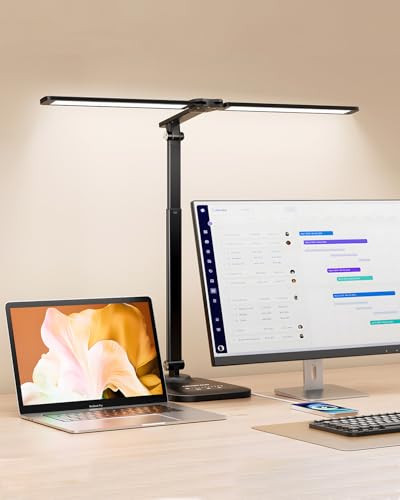
CHARYJOD Height-Adjustable Architect Desk Lamp
The long reach and infinite brightness control make it ideal for drafting, crafting, and detailed workbench tasks.
Honeywell HWT-H2 Full-Spectrum LED Desk Lamp
Full-spectrum output more closely mimics daylight, which many users find noticeably easier on the eyes during long sessions.
Motumen LED Clamp Desk Lamp
Despite the low price it still offers eye-care-focused, adjustable lighting in a sleek black finish.
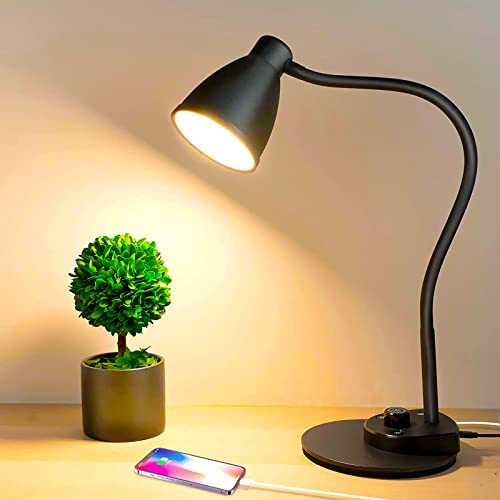
BOHON LED Desk Lamp with USB Charging Port
It is a well-rounded everyday lamp for a home office that doubles as a phone-charging station.
What to Look For in a Lamp Meant to Ease Eye Strain
Eye strain at a desk rarely comes from one cause. Lighting guidance generally points to four variables that interact: how much light lands on the work surface, how warm or cool it looks, whether it flickers, and where the glare goes. A lamp can be handsome and still miss on any one of them, so it helps to know the numbers before comparing models.
Light on the Page, Not Lumens on the Box
Lumens describe how much light a lamp emits in total. Lux describes how much actually reaches your paper or keyboard, and that is the figure that matters for comfort. Office-lighting guidance commonly cites roughly 300 to 500 lux for reading, writing, and screen work, with detailed or prolonged paperwork sometimes pushed higher. As a rough rule, a lamp rated around 800 lumens held 16 to 24 inches above the desk lands in that range inside its beam. That is why a model such as the LEPOWER 800LM sits in a sensible spot for general desk work, while a far dimmer lamp forces the eyes to work harder to resolve text.
More is not automatically better. Very bright light on glossy paper or a laptop bezel produces reflected glare, and the eye tires fighting it. A lamp with several brightness steps lets you match output to the room instead of running everything at maximum.
Color Temperature and the Time of Day
Color temperature is measured in kelvins. Roughly 2700K to 3000K reads as warm and relaxed, around 4000K as neutral white, and 5000K to 6500K as cool daylight. Many people find neutral to cool light helpful for daytime concentration and warm light easier in the evening, although individual preference varies widely. A lamp with adjustable color modes covers both without a second fixture. If a listing offers only one fixed color, confirm which one before buying.
Flicker You Cannot See
Many inexpensive LED drivers dim by switching the light on and off very rapidly, a method called pulse-width modulation. At high frequencies the flicker is invisible, but some people report headaches or tired eyes under low-frequency versions, particularly at lower brightness settings where the off-time is longer. The IEEE 1789 recommended practice addresses flicker frequency and modulation depth for exactly this reason. Few lamp listings publish those figures, so look for wording such as “flicker-free” or “DC dimming,” and treat it as a claim to confirm rather than a guarantee. A quick phone-camera check, which often shows banding in the image of a flickering light, can raise a warning, though it is not a measurement.
Reach, Glare, and Where the Light Comes From
Placement counts as much as specification. Lighting professionals commonly suggest positioning the lamp to the side opposite your writing hand and slightly forward of your shoulder, so your hand does not cast a shadow on the page. Keep the bulb or LED panel out of direct sight, since a bare bright source in your peripheral vision is a classic glare trigger. This is where the lamp’s mechanical design matters. An architect-style arm like the CHARYJOD Height-Adjustable lamp offers long reach and many angles, a clamp such as the Motumen frees up desk surface, and a compact base-mounted lamp is easier to move between workspaces.
Which One Should You Buy?
| If you… | Choose… |
|---|---|
| Want a straightforward all-round desk lamp for reading and homework | LEPOWER 800LM Eye-Caring Desk Lamp |
| Need reach and many adjustment angles over a wide desk | CHARYJOD Height-Adjustable Architect Desk Lamp |
| Care most about a full-spectrum light source for color-accurate work | Honeywell HWT-H2 Full-Spectrum LED Desk Lamp |
| Have a crowded desk and a surface edge thick enough to clamp | Motumen LED Clamp Desk Lamp |
| Charge a phone or small device at the desk while you work | BOHON LED Desk Lamp with USB Charging Port |
Treat the table as a starting filter. Confirm brightness steps, color options, and clamp opening size on each listing, since those details can differ between versions of the same lamp.
A Simple Setup Sequence
- Turn off the overhead light briefly and look at where shadows fall from your hand while writing.
- Place the lamp on the side opposite your writing hand, so the shadow lands away from the paper.
- Raise or lower the head until the light source sits above eye level and is not visible in your direct line of sight.
- Set the brightness to the lowest level that lets you read small print comfortably.
- Pick a color mode that suits the hour: cooler for daytime focus, warmer in the evening.
- Check your monitor. The screen should not be dramatically brighter or dimmer than the lit desk, since constant adjustment between the two is a known source of fatigue.
Common Mistakes When Buying a Lamp for Eye Strain
- Chasing the biggest lumen number. Total output says little about what reaches the desk. Beam spread, distance, and diffusion decide that.
- Ignoring the dimming range. A lamp that bottoms out at a still-bright level cannot comfortably serve a dark room at night.
- Placing the lamp in front of you. A light behind a monitor or directly ahead produces reflections on the screen and in glasses.
- Skipping flicker information. If you are prone to headaches under certain bulbs, “flicker-free” deserves attention.
- Assuming any clamp fits any desk. Thick edges, glass tops, and rounded lips may not grip properly, so confirm the clamp opening before ordering.
- Using the lamp as the only light source. A very bright spot in a dark room creates a harsh contrast. A dim ambient light helps your eyes avoid constant adjustment.
Matching the Lamp to the Task
Different desk activities place different demands on a lamp, and the same fixture may not suit all of them. The comparison below summarizes common guidance on what each activity tends to need.
| Task | What matters most | Typical approach |
|---|---|---|
| Reading printed text | Even light across the page, no shadow from your hand | Lamp on the side opposite the writing hand, moderate brightness |
| Typing at a monitor | Low glare on the screen, modest contrast with the room | Lamp aimed at the desk surface, not the screen, with dimmer settings |
| Drawing, crafts, or detailed work | Higher brightness and good color accuracy | Adjustable arm with a full-spectrum or high-color-rendering source |
| Late-evening study | Warm tone, gentle output | Lower brightness step and warmer color mode |
The practical takeaway is that adjustability beats a single perfect setting. A lamp with several brightness steps, more than one color mode, and an arm that moves freely will fit more of these situations than a fixed-output design.
Common Complaints That Hint at Lighting Problems
Burning or dry eyes, headaches near the forehead, and blurry text late in the day are commonly associated with a mix of screen time, glare, and poor contrast. If the symptoms ease when you move the lamp or lower its brightness, lighting is probably part of the cause. If they do not, the issue may involve screen settings, posture, or your eyes themselves.
Habits a Lamp Cannot Replace
Even ideal lighting does not cancel the strain of staring at one distance for hours. Eye-care organizations frequently suggest the 20-20-20 habit: every 20 minutes, look at something about 20 feet away for 20 seconds. Blinking tends to drop during intense screen use, so deliberate blinking and a screen placed roughly an arm’s length away also help. Persistent pain, double vision, or headaches that return daily deserve an eye exam rather than a lamp upgrade.
Frequently Asked Questions
Can a desk lamp really reduce eye strain?
Yes; a flicker-free lamp with adjustable brightness and color temperature lets your eyes work in balanced light instead of straining against glare or dimness, which markedly reduces fatigue.
What color temperature is best for the eyes?
Use warmer 3000K light for relaxed reading and cooler 4500 to 5000K light for focused detail work; the ability to switch between them is ideal.
How bright should a desk lamp be?
Around 800 lumens suits most desks, providing clear task lighting without the harsh glare that causes squinting and headaches.
Do clamp lamps work on any desk?
Clamp lamps like the Motumen fit most desk edges up to a couple of inches thick, freeing surface space, but confirm your desktop thickness before buying.
Final Thoughts
Whichever you pick, choosing a flicker-free, dimmable LED with adjustable color temperature is the single most effective lighting upgrade for tired eyes in 2026.
More from Amazon
Programs that pair well with the guide above. Offers and eligibility are set by Amazon and may change.
Collect the home and kitchen items you want in one registry that guests can shop from.
Create a wedding registrySet up recurring deliveries of everyday items on eligible products. Terms and savings are set by Amazon.
Explore Subscribe & SaveFree shipping on eligible items, Prime Video and more. Eligible new members can start with a free trial.
Start a Prime free trialAudiobooks and podcasts to listen to on the go. Eligible new members can start with a free trial.
Try Audible freeAs an Amazon Associate we earn from qualifying purchases.