Best Smart Locks for Front Doors and Keyless Entry
Compare five smart locks for front doors, from fingerprint deadbolts to a retrofit model, with Wi-Fi, keypad codes and voice control explained clearly.
A smart lock changes the daily front-door routine from hunting for keys to tapping a code, pressing a finger to a sensor, or unlocking from a phone. The five locks in this guide all connect over built-in Wi-Fi, so none needs a separate hub for alerts or app control.
They still differ in important ways. Four are full deadbolt replacements with exterior keypads, while one is a retrofit unit that works with the deadbolt already on the door. Two read fingerprints, one supports Apple Home Key, and one arrives as a complete handle set. The sections below set out what each model does, using the details stated in its listing.
As an Amazon Associate, we earn from qualifying purchases.
Quick answer
For most front doors, the Schlage Encode Plus is the most complete pick, with built-in Wi-Fi, a touchscreen keypad and Apple Home Key support. The Yale Assure Lock 2 Touch adds fingerprint unlocking, while the August Wi-Fi Smart Lock suits renters because it fits over an existing deadbolt and keeps the original keys working.
The Schlage Encode Plus is the most fully featured lock in this group. It replaces the existing deadbolt with a touchscreen unit in an Aged Bronze finish with Camelot trim, and its Wi-Fi radio is built in, so it connects to a home network directly without a bridge or hub. Entry can be by code on the keypad, through the maker’s app, or by holding an iPhone or Apple Watch near the lock, since the model supports Apple Home Key tap-to-unlock. The listing states storage for up to 100 access codes. Schlage documentation rates the lock ANSI/BHMA Grade AAA, also described as Grade 1; that grade is a manufacturer statement, presented as such here. As a full replacement, the old deadbolt comes off the door, so check the listing’s fit notes for door thickness and backset before ordering.
The Yale Assure Lock 2 Touch is the fingerprint-first option in this guide. Its touchscreen deadbolt, finished in Satin Nickel, includes a fingerprint scanner alongside the keypad, so entry can be a single touch once a print is enrolled. The design is key-free, meaning there is no keyway on the outside at all; the listing presents this as a deliberate design choice. Built-in Wi-Fi connects the lock without a hub, and Yale’s DoorSense sensor reports whether the door is closed or left ajar. Power comes from four AA batteries. Households that want a traditional key fallback should look at the August or ULTRALOQ picks instead, which keep key access in different ways. For everyone else, fingerprint entry, door sensing and a clean key-free exterior suit busy front doors where several people come and go at different times of day.
The Kwikset Halo is a touchscreen deadbolt in Matte Black that focuses on code management. Its built-in Wi-Fi needs no hub, and the listing states support for up to 250 user codes, the largest code capacity in this group, which suits homes with frequent guests, rental turnover or several regular service providers. The touchscreen uses Kwikset’s SecureScreen feature, which asks the user to tap two random digits before entering a code, so touch marks on the glass do not cluster around the real numbers. An auto-lock function can relock the door after an interval, a useful backstop for households that often leave in a hurry. The listing gives a BHMA Grade AAA rating, stated here as the manufacturer’s claim, and the lock works with Alexa. Fit is specified for doors 1-3/8 to 1-3/4 inches thick, but the listing’s fit notes should still be checked against the actual door before ordering.
Spec
Detail
Lock type
Touchscreen deadbolt
Finish
Matte Black
Model
99390-004
Connectivity
Built-in Wi-Fi, no hub required
Unlock methods
Keypad codes with SecureScreen, app, voice control
The August Wi-Fi Smart Lock takes a different approach from the other four picks. Instead of replacing the deadbolt, this fourth-generation unit mounts on the inside of the door over the existing deadbolt, so the exterior hardware stays exactly as it is and the original keys keep working. That suits renters, doors with decorative exterior trim, and anyone who wants smart features without changing how the door looks from the street. Wi-Fi is built in, so no hub is required, and a DoorSense sensor is included to report whether the door is shut or ajar. The lock works with Alexa, Google Assistant, HomeKit and SmartThings, the widest assistant list in this guide. Power comes from two CR123 batteries rather than the AA cells used by most other picks. Because it drives the existing deadbolt, check the listing’s compatibility notes for the deadbolt already on the door before ordering.
Spec
Detail
Lock type
Retrofit unit that fits over the existing deadbolt
Finish
Matte Black
Model
AUG-SL05-M01-G01
Connectivity
Built-in Wi-Fi, no hub required
Key access
Existing keys and exterior hardware stay in place
Voice assistants
Alexa, Google Assistant, HomeKit, SmartThings
Batteries
2 CR123
ULTRALOQ U-Bolt Pro WiFi Fingerprint Smart Lock with Handle
ULTRALOQ U-Bolt Pro WiFi Fingerprint Smart Lock with Handle
The ULTRALOQ U-Bolt Pro WiFi with Handle is the only pick here sold as a complete lever handle set rather than a deadbolt alone, so it replaces both the latch handle and the lock in one package. Entry options are the broadest in the group: a fingerprint reader, an anti-peep keypad that accepts extra digits around the real code, app control, and automatic unlock and lock functions. A door sensor is included in the box. The lock connects over built-in 2.4 GHz Wi-Fi with no hub, and it works with Alexa and Google Assistant. ULTRALOQ states an ANSI/BHMA Grade 1 rating for the lock and an IP65 rating for the exterior unit; both figures are manufacturer statements from the listing, presented as such. Two mechanical backup keys are included, and the unit runs on four AA batteries. It suits doors where the whole hardware set is being refreshed; households that only need a deadbolt should compare the first four picks, which leave the existing handle in place.
How to choose
Start with the mounting style, because it decides how much hardware changes. The Schlage, Yale and Kwikset picks replace the deadbolt outright. The August keeps the existing deadbolt and keys, which suits rentals and decorative doors. The ULTRALOQ replaces the handle as well, which suits a full hardware refresh. Next, compare unlock methods against the household: fingerprint readers on the Yale and ULTRALOQ suit people who dislike codes, the Schlage adds Apple Home Key for iPhone and Apple Watch households, and code capacity ranges from up to 100 codes on the Schlage to up to 250 on the Kwikset, per their listings. All five locks list built-in Wi-Fi, so none needs a hub, but the door still needs a reliable Wi-Fi signal; the ULTRALOQ specifies a 2.4 GHz connection. Fit is the step that cannot be skipped: check the listing’s fit notes for door thickness, backset and, for the retrofit pick, the deadbolt already installed, since no smart lock fits every door. Finally, note the battery type, AA for most and CR123 for the August.
Who should skip
Skip the key-free Yale if a physical key backup is non-negotiable, since that model has no keyway at all. Skip any of these locks if the front door sits beyond reliable Wi-Fi range, because remote alerts and app control depend on that connection. Renters whose lease forbids hardware changes should confirm the rules before choosing a full replacement deadbolt; the retrofit August is gentler, but it still attaches to the door. Anyone whose door falls outside a listing’s stated thickness or backset range should skip that model rather than plan on modifying the door. And if nobody in the household will maintain batteries or use an app, a conventional deadbolt remains the simpler tool.
FAQ
Do any of these smart locks need a separate hub?
No. All five picks list built-in Wi-Fi, so each connects to a home network directly for app control and alerts.
What happens when the batteries run out?
All five locks are battery powered, using AA cells in most cases and CR123 cells in the August, so changing batteries on the maker’s schedule is part of ownership. The August keeps the original keys working, and the ULTRALOQ includes two mechanical backup keys; the Yale is key-free by design, so timely battery changes matter most there.
Will one of these locks fit any front door?
No. Fit varies by model, and listings state their own requirements; the Kwikset Halo, for example, is specified for doors 1-3/8 to 1-3/4 inches thick. Check the listing’s fit notes for thickness and backset, and for the August, its deadbolt compatibility notes, before ordering.
How many people can have their own code?
Per their listings, the Schlage Encode Plus stores up to 100 access codes and the Kwikset Halo up to 250 user codes. The fingerprint models instead enrol fingerprints alongside codes.
Final verdict
For a single recommendation, the Schlage Encode Plus covers the most ground: built-in Wi-Fi, a touchscreen keypad, up to 100 codes and Apple Home Key in one deadbolt. The Yale Assure Lock 2 Touch is the pick for fingerprint entry without a keyway, the Kwikset Halo suits code-heavy households, the August is the renter-friendly retrofit, and the ULTRALOQ is the choice when the handle is being replaced too. Whichever model is chosen, confirm the listing’s fit notes against the actual door first.
H
Home Beautiful Design Editorial Team
We compare specs, materials and verified owner reviews before a product earns a spot. Rankings are never paid.
Affiliate disclosure. As an Amazon Associate we earn from qualifying purchases at no extra cost to you. Prices accurate as of the date shown.
Discover the best reed diffuser for living rooms, bedrooms, and bathrooms. Compare five elegant, long-lasting reed diffusers for inviting home fragrance.

 Schlage Encode Plus Smart Wi-Fi Lock
 Yale Assure Lock 2 Touch Deadbolt
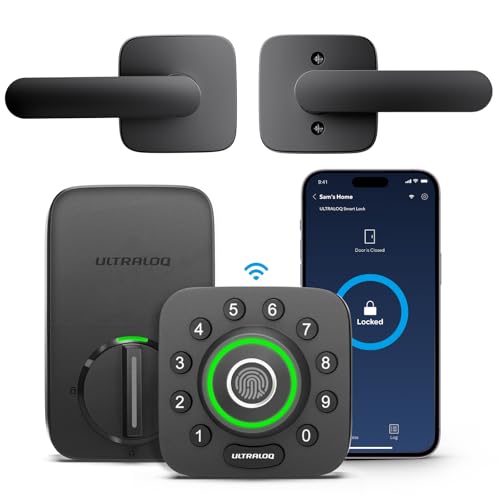 ULTRALOQ U-Bolt Pro WiFi Fingerprint Smart Lock with Handle