Our Top Picks


The best smart bulbs are the ones that work with the app, voice assistant, and fixtures you already have. Pick the connection type first (Wi-Fi, Bluetooth, hub-based Zigbee, or Thread with Matter), then confirm the base size and bulb shape, the lumen output, the color options you need, and whether the fixture is enclosed or on a wall dimmer. A smart bulb that fits poorly or pairs badly with your phone or speaker will frustrate you faster than a regular bulb ever could, so a short check before you buy saves a lot of effort.
In this guide
- Connection types compared
- Compatibility with your assistant and app
- Base, shape, and fixture fit
- Brightness, color, and white tones
- Wall switches and dimmers
- Use cases by room
- Setting up for daily use
- Privacy, updates, and safety
- Common mistakes
- Who should choose what
- Checklist
- FAQ
Connection types compared
How a bulb talks to your phone and the rest of your home shapes the whole experience. There are four broad families, and each suits a different kind of household.
Wi-Fi bulbs
These connect directly to your router, so there is nothing extra to buy. Setup is usually a matter of installing the app, screwing in the bulb, and following the prompts. Many Wi-Fi bulbs connect only on the 2.4GHz band, which matters if your router combines bands under one name. The downside is scale: every bulb is its own network device, and dozens of them can strain a basic router.
Bluetooth bulbs
Bluetooth bulbs pair straight with your phone, which makes them the easiest and cheapest way to try smart lighting in a single room. Range is short, remote access from outside the house is usually limited, and voice control may require a separate gateway or speaker support. Some bulbs also support Bluetooth mesh, which extends range by relaying signals between bulbs.
Hub-based bulbs (Zigbee and similar)
These use a low-power mesh protocol and connect through a bridge or a smart speaker with a built-in hub. They tend to be responsive and reliable across a whole home because each bulb helps relay signals, and they do not load your Wi-Fi. The trade-off is the extra device, which is a cost and a setup step.
Thread and Matter
Matter is a shared standard meant to let devices from different makers work with various ecosystems, and Thread is a low-power mesh network that many Matter devices use. Together they aim to reduce the lock-in that earlier smart bulbs had. Support is still developing, and a Matter bulb does not necessarily expose every feature in every app, so read exactly what the listing says is supported. Thread bulbs usually need a Thread border router, which some smart speakers and displays provide.
| Type | How it works | Needs a hub? | Good for | Watch out for |
|---|---|---|---|---|
| Wi-Fi | Joins your router directly | No | A few bulbs, easy start | Crowding the network; 2.4GHz only on many models |
| Bluetooth | Pairs with your phone | No | One room, tight budgets | Short range; limited remote access |
| Zigbee or similar | Mesh through a bridge | Yes (or compatible speaker) | Whole-home setups | Extra device; ecosystem-specific bridges |
| Thread and Matter | Standard-based mesh and cross-platform control | Needs a border router and Matter controller | Mixing brands and platforms | Feature support varies |
Compatibility with your assistant and app
Before comparing bulbs, look at what you already own. If your household runs on a particular voice assistant, a phone platform, or a smart home app, you want bulbs that are named as compatible with it, not merely hinted at. Look for plain statements in the listing, such as support for a specific assistant, or for Matter along with the platforms it has been confirmed with.
Next, think about the app. Each maker offers its own app, and some features, such as scenes, schedules, and effects, may only appear in that app. If you plan to mix brands, you will either juggle several apps or lean on a central one, so pick a main control point and make sure each bulb works with it. The simplest setup uses one family of bulbs and one app; the most flexible uses Matter bulbs controlled from your platform of choice.
Finally, check what happens when the internet is down. Some bulbs keep local control over the home network while others depend on a cloud service for everything. Manufacturers describe this differently, so look for language about local control if it matters to you.
Base, shape, and fixture fit
Base types
In the United States, standard household bulbs usually have an E26 screw base, while candelabra sockets, such as chandeliers and some sconces, use a smaller base, often called E12. Other regions use different standards, such as E27 for standard screw bases. Spotlights may use GU10 or similar pin-type bases. Check the socket or the old bulb, and match it exactly.
Shape and size
Bulb shapes are named with letters and numbers. A-shape bulbs are the familiar pear form. BR30 and similar reflector shapes are common in recessed ceiling cans and throw light downward. Globe bulbs suit bathroom vanities, and candle-shaped bulbs suit decorative fixtures. Smart bulbs often have a larger neck than ordinary bulbs because of their electronics, which can be an issue in tight, narrow fixtures. Measure if the fixture is snug.
Enclosed fixtures and heat
Fully enclosed fixtures trap heat, and heat shortens the life of electronics. Use a bulb that is labeled as suitable for enclosed fixtures, and do not exceed the maximum wattage on the fixture label. LED smart bulbs use far less power than the incandescent bulbs they replace, so the fixture’s rating is usually not a problem, but the enclosed-fixture label still applies. For outdoor use, damp locations, or any location with unusual conditions, choose a bulb rated for it.
| Fixture | Typical bulb choice | Check |
|---|---|---|
| Table and floor lamps | A-shape, standard base | Shade size and how the bulb is oriented |
| Recessed ceiling cans | BR-shape or retrofit bulbs | Diameter and whether the can is insulated or enclosed |
| Chandeliers and sconces | Candelabra-base bulbs | Base size and bulb length |
| Track and spot lights | Spot-style bulbs with the matching base | Beam angle and base type |
| Outdoor fixtures | Bulbs labeled for outdoor or damp use | Temperature range and sealed fixtures |
Brightness, color, and white tones
Brightness
Brightness is measured in lumens, not watts. A traditional 60-watt incandescent produced roughly 800 lumens, and many people use that as a mental reference when they replace bulbs. Match the lumen output of the bulb you are replacing, then adjust. In a bedroom you may want less; in a kitchen or office you may want more. Smart bulbs can be dimmed in the app, so a slightly brighter bulb is rarely a mistake.
White only, tunable white, or full color
- White only bulbs are the simplest and typically the most affordable. They are ideal for hallways, closets, and any place where you only need to turn light on, off, or down.
- Tunable white bulbs let you shift between warm, relaxing tones and cooler, energizing ones. Many people find this the most useful smart feature, since you can go warm in the evening and cooler for work.
- Full color bulbs add a range of hues for mood, parties, and gaming. They are fun but not necessary everywhere, and the white they produce may be less refined than a dedicated white bulb.
Color quality
If you care about how skin tones, food, or décor look, look for a stated color rendering index (CRI) of around 90 or higher when the listing provides it. Color temperature is measured in kelvins: roughly 2700K is warm and cozy, 4000K is neutral, and 5000K and above is cool daylight. Keep color temperatures consistent within a room, since mixing warm and cool bulbs can look uneven.
Wall switches and dimmers
This is the most common source of trouble. A smart bulb needs constant power to listen for commands. If someone flips the wall switch off, the bulb loses power and disappears from the app and from voice control, until the switch is flipped back on.
Standard wall dimmers are another problem. They cut the power to the bulb in a way that smart bulbs are not designed to handle, and the result can be flicker, buzzing, or dropped connections. The usual advice is to keep the wall switch on and use the app, voice, or a smart remote instead. Some people tape over the switch or fit a switch guard for family members who might flip it out of habit.
If you want to keep a physical control, there are two good options. The first is a wireless smart button or dimmer remote that pairs with the bulbs and can be placed anywhere, including on the wall plate. The second is to use a smart switch in place of the wall switch and keep regular bulbs on it. A smart switch is a better fit for fixtures with several bulbs or for ceiling lights that are hard to reach. Replacing a wall switch involves mains wiring, so turn off the breaker, follow the instructions, and consider hiring an electrician if you are not comfortable with it.
| Approach | Works well for | Trade-off |
|---|---|---|
| Smart bulbs with the wall switch left on | Lamps and bedrooms | Others may turn the switch off by habit |
| Smart bulbs with a wireless remote or button | Shared rooms and guests | An extra device to place and charge or replace the battery |
| Smart switch with ordinary bulbs | Multi-bulb ceiling fixtures, hallways | No color changing; wiring work |
| Standard dimmer with smart bulbs | Generally avoid | Flicker and connection problems |
Use cases by room
Bedroom
Smart bulbs shine here. A warm, dim evening scene, a gentle wake-up brightening, and a very low nightlight setting make a real difference. Choose a tunable white bulb with good low-end dimming, and avoid very bright blue-toned light close to bedtime.
Living room
Scenes pay off: bright for cleaning, soft for dinner, a color wash for a movie night. A mix of lamps with tunable white or color bulbs and a main ceiling fixture on a simple switch often works best.
Kitchen and bathroom
These are practical spaces. A good white light with a high CRI is more useful than a color bulb. Bathrooms and kitchens may have enclosed or damp-rated fixtures, so check ratings carefully.
Hallways, closets, and entries
These are places where people flip the switch many times a day. A smart bulb adds little, and the extra complexity can cause more confusion than convenience. A simple LED bulb or a motion-sensing fixture may suit better, though a smart bulb on a schedule works for a porch or entry light.
Setting up for daily use
- Install the app and create the account before you screw in any bulbs, and update the app and any hub.
- Add one bulb at a time and give it a clear, room-based name such as Bedroom Lamp, so voice commands are easy and unambiguous.
- Group bulbs that share a fixture or room so they respond together.
- Create two or three simple scenes, such as Evening, Bright, and Night, before building elaborate automations.
- Set simple schedules, such as warm light in the evening and a gentle brightening in the morning.
- Set a default power-on state so that a bulb does not return in an odd color or at full brightness after a power cut.
- Give housemates and guests an easy way to operate the lights: a physical remote, a labeled button, or a quick tutorial on the voice command.
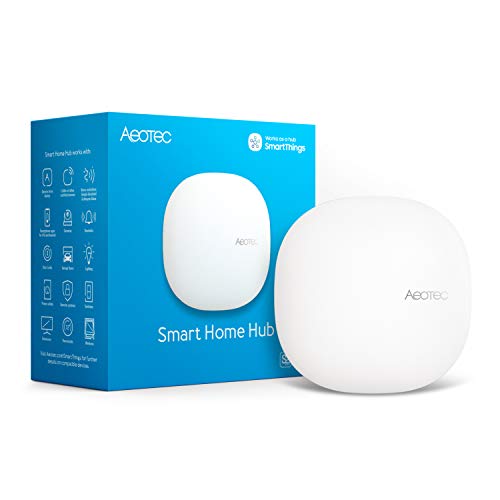
Start small. Buy a starter pack of smart bulbs, try them for a few weeks in the rooms where you use light most, and then expand. If you end up with many rooms, a smart home hub or a compatible speaker can simplify control. A wireless smart button is a useful addition for shared rooms.
Privacy, updates, and safety
- Use a strong, unique password for the smart bulb account, and enable two-step verification if it is offered.
- Check what the app asks permission to do, and review its privacy settings. Turn off anything you do not need, such as location access or sharing.
- Apply firmware and app updates when they are available, since they can fix bugs and security issues.
- When selling or giving away a bulb, perform a factory reset so it is removed from your account.
- Always switch off the power at the breaker, or at least turn the bulb off and let it cool, before changing a bulb in an enclosed or high fixture. Do not exceed the fixture’s rating.
- If a bulb smells hot, buzzes, or flickers continuously, replace it and avoid using it until you know why.
Common mistakes
- Turning the bulb off at the wall switch, which cuts its connection.
- Mixing many unrelated brands, each with its own app and quirks.
- Putting a bulb that is not rated for enclosed fixtures into a sealed fixture.
- Buying color bulbs for rooms where you only need good white light.
- Using a standard dimmer switch with smart bulbs.
- Assuming Matter means everything works everywhere, without reading which features are supported.
Who should choose what
| If you are… | Consider | Why |
|---|---|---|
| Trying smart lighting for the first time | Wi-Fi or Bluetooth starter pack | No hub, quick setup, low commitment |
| Outfitting a whole home | Hub-based or Matter and Thread bulbs | Better scaling and reliability |
| Mixing brands or platforms | Matter-compatible bulbs | Designed to work across ecosystems |
| Focused on sleep and comfort | Tunable white with good low-end dimming | Warm evenings, gentle mornings |
| Living in a shared home or rental | Bulbs plus a wireless remote | No wiring changes and easy for others |
| Wanting reliable wall control | Smart switch with standard bulbs | Keeps the switch working for everyone |
Checklist
- List the fixtures that need bulbs, with their base types and shapes.
- Check whether any fixtures are enclosed, damp-rated, or outdoors.
- Choose a connection style that fits the size of your home.
- Confirm compatibility with your assistant or app, and read what is actually supported.
- Decide on white, tunable white, or color for each room.
- Match the lumen output of the bulbs you are replacing.
- Check whether any fixtures use a wall dimmer, and plan around it.
- Start with a starter pack, then expand.
FAQ
Do smart bulbs need a hub?
Not always. Wi-Fi and Bluetooth bulbs work without one, while Zigbee-style bulbs usually need a compatible hub or speaker. Matter bulbs over Thread need a Thread border router.
Can smart bulbs work without internet?
Some local controls work without it, but voice commands, remote access, and some schedules generally need a connection. Check the product description for local control.
How long do smart bulbs last?
The lifespan is listed on the package and varies by product and use. Heat from an enclosed fixture and frequent power cycling can shorten it, so compare the stated hours.
Can I use a smart bulb on a dimmer switch?
It is usually best not to. Standard dimmers can cause flicker, buzzing, or dropped connections. Leave the switch on and use the app, or use a smart switch with regular bulbs instead.
Why does my bulb show as unavailable in the app?
The most common cause is that the wall switch was turned off. Other causes include a weak Wi-Fi signal at the bulb, a router that changed channels or settings, or the need for a firmware update. Turn the bulb off and on, check the signal, and try re-adding it if needed.
Can I mix different brands of smart bulbs?
Yes, but it is easier with a shared standard such as Matter or one control platform. Otherwise expect separate apps.
Do smart bulbs use power when off?
They draw a small standby amount to stay connected; the product details usually list it.
Are they a good idea for photographers?
They are handy for adjusting room light temperature and adding color accents. Dedicated photo lighting is better for accurate color rendering of a subject.
Conclusion
The best smart bulbs for you are the ones that match your fixtures, your app, and your habits. Start with the connection type that fits the size of your home, confirm the base and bulb shape, decide how much color you really need, and plan around wall switches and dimmers before you buy. Name bulbs clearly, build a few simple scenes, keep the apps updated, and add more only after the first ones prove useful. A modest, well-planned setup will serve you far better than a houseful of mismatched bulbs.
As an Amazon Associate we earn from qualifying purchases, at no extra cost to you.
More from Amazon
Programs that pair well with the guide above. Offers and eligibility are set by Amazon and may change.
Collect the home and kitchen items you want in one registry that guests can shop from.
Create a wedding registrySet up recurring deliveries of everyday items on eligible products. Terms and savings are set by Amazon.
Explore Subscribe & SaveFree shipping on eligible items, Prime Video and more. Eligible new members can start with a free trial.
Start a Prime free trialAudiobooks and podcasts to listen to on the go. Eligible new members can start with a free trial.
Try Audible freeAs an Amazon Associate we earn from qualifying purchases.